AreaIntelig — WordPress Real Estate Intelligence Plugin
Full reference covering installation, setup, area profiles, properties, 67 shortcodes, Smart Assistant, Contact Leads CRM, reports, settings, and tools.
Table of Contents
Overview
AreaIntelig is a complete real estate intelligence plugin for WordPress. It goes far beyond standard property listings — it turns every property page into a rich investment analysis dashboard complete with area scores, price trend charts, ROI signals, deal scoring, mortgage estimates, smart search, interactive OpenStreetMap maps, a rule-based smart assistant, contact lead CRM, price alerts, saved properties, and printable PDF-ready reports.
All data comes from fields you fill in the WordPress admin panel. No external subscription, API key, or paid service is ever required.
What AreaIntelig Provides
Area Intelligence
Area scores, nearby places, price trends, and predictions — all from your data.
ROI & Finance
ROI signals, mortgage calculator, deal scoring, cost breakdowns, and benchmarks.
Smart Search
Filterable frontend property search with real-time results and area context.
Smart Assistant
Rule-based assistant that answers Q&A about any property or area profile.
Contact Leads CRM
Every contact form submission becomes a manageable lead with status, notes, and CSV export.
Reports & Exports
Branded printable reports, CSV exports for properties and leads, area snapshots.
Dark Mode
Full dark mode support. System / Light / Dark — visitor toggleable.
RTL Support
Full RTL CSS for Arabic, Hebrew, Urdu, Persian, and other RTL languages.
67 Shortcodes
Every widget available as a standalone shortcode for any page builder.
Author & Brand
AreaIntelig is built and maintained by AdnanThemes, an Envato author publishing WordPress themes and plugins since 2014. AreaIntelig is developed in-house: there is no third-party PHP framework, no purchased code base, and no white-labelled component inside it.
| Item | Detail |
|---|---|
| Author | AdnanThemes |
| Website | adnanthemes.com |
| Version | 1.0.0 |
| License | GPLv2 or later |
| Support | Through the item’s CodeCanyon Comments and Support tabs |
Requirements
AreaIntelig runs on a standard WordPress install. It needs no companion plugin, no theme framework, and no API key to deliver its core features.
| Requirement | Minimum | Recommended |
|---|---|---|
| WordPress | 6.0 | Latest (tested up to 7.0) |
| PHP | 8.0 | 8.1 or newer |
| Theme | Any standards-compliant modern theme | Classic or block (FSE) themes both supported |
| Plugins | None required | WooCommerce only if you want paid visit bookings |
| API keys | None required | All external services are optional and off by default |
| Multisite | Supported | Network activation works; each site keeps its own data |
Installation
Install AreaIntelig the same way as any other WordPress plugin. The whole process takes about a minute.
Method 1 — WordPress Admin (recommended)
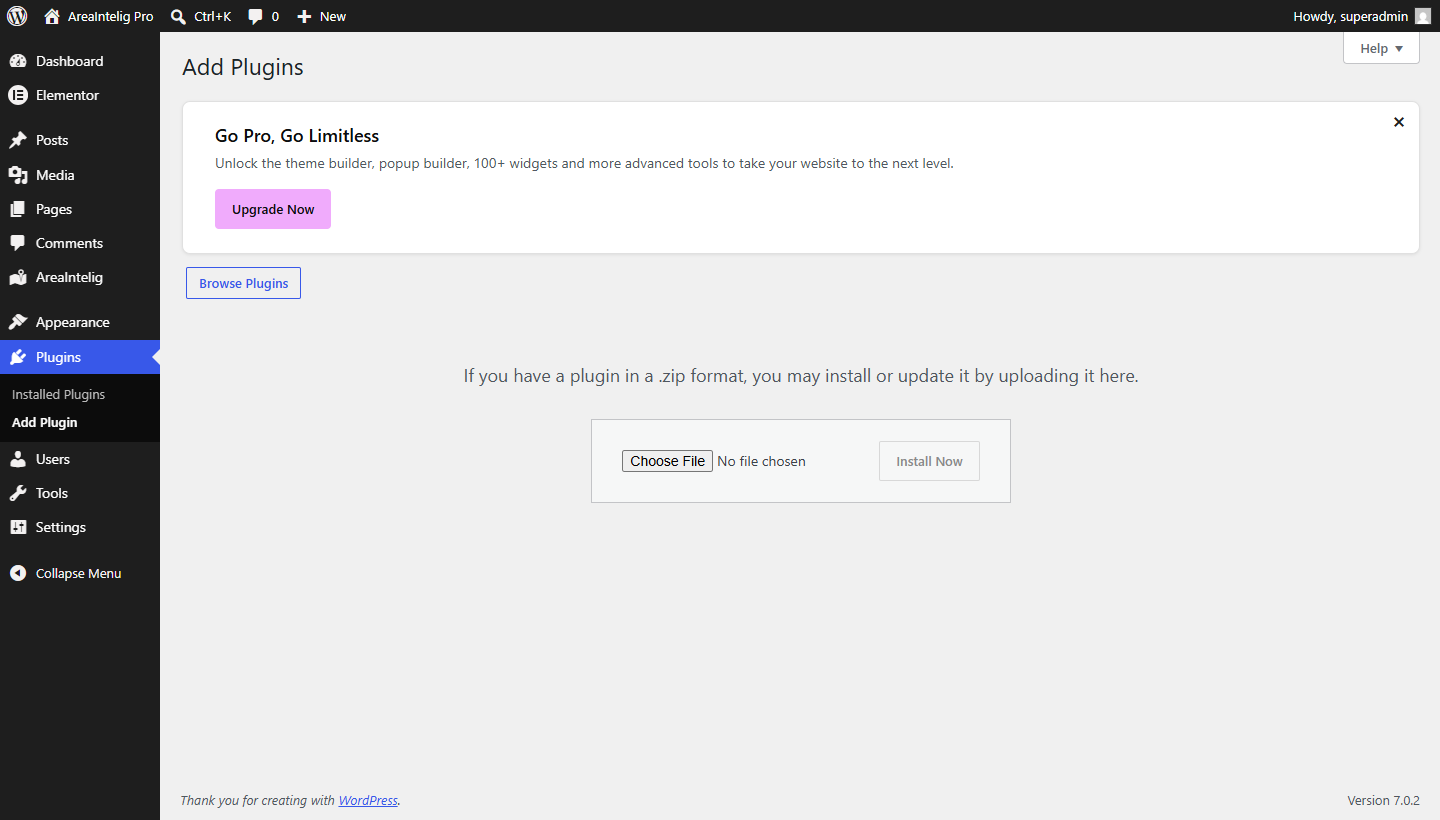
1️⃣ Open the uploader
In WordPress go to Plugins → Add New, then click Upload Plugin at the top of the screen.
2️⃣ Choose the file
Select areaintelig-v1.0.0-installable.zip from the extracted download and click Install Now.
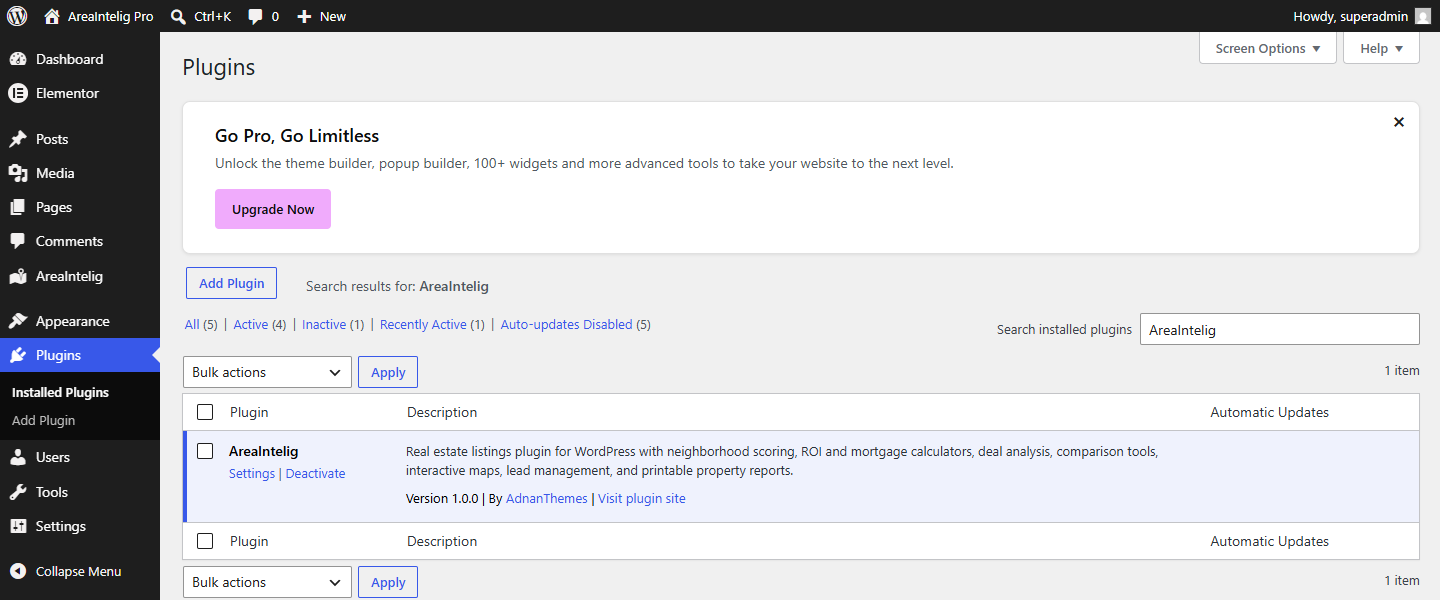
3️⃣ Activate
When the upload finishes, click Activate Plugin.
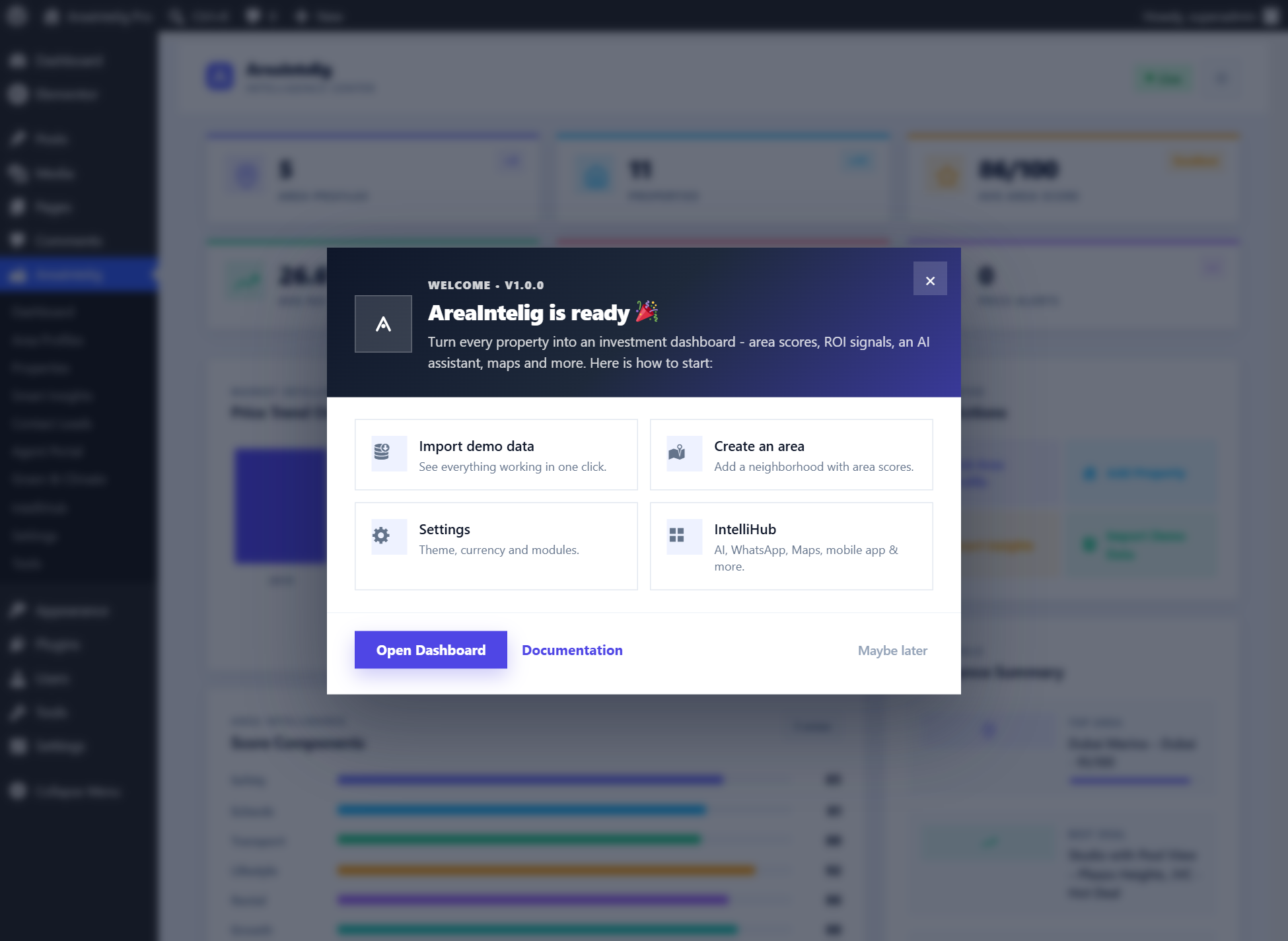
4️⃣ Follow the Setup Wizard
A four-step wizard opens automatically: Welcome, Demo Data, Area, Done. You can complete it or click Skip for now and configure things later.

Method 2 — FTP / SFTP
If your host limits upload size, install manually instead:
| Step | Action |
|---|---|
| 1 | Extract areaintelig-v1.0.0-installable.zip on your computer. You will get a single folder named areaintelig. |
| 2 | Upload that whole areaintelig folder into /wp-content/plugins/ on your server. |
| 3 | In WordPress open Plugins and click Activate under AreaIntelig. |
After activation
AreaIntelig registers two post types — Area Profiles and Properties — and adds its own top-level admin menu. Nothing is published and no demo content is created until you ask for it.
First Setup — Recommended Flow
Follow this order for the smoothest initial setup. Each step builds on the previous one.
1️⃣ Review Settings
Go to AreaIntelig → Settings. Set your default currency, accent color, dark mode default, assistant options, and data retention preference before adding any content.
2️⃣ Create Area Profiles
Go to AreaIntelig → Area Profiles → Add New. Fill in the title, description, image, city, country, coordinates, scores, nearby places, investment notes, and price trend data.
3️⃣ Add Properties
Go to AreaIntelig → Properties → Add New. Fill in price, currency, address, area size, rooms, ROI data, mortgage data, costs, media, and agent details. Then connect to an Area Profile using the Area Intelligence sidebar box.
4️⃣ Create Frontend Pages
Create WordPress pages and paste the property shortcode, or simply visit the single property URL directly — AreaIntelig auto-injects the full dashboard on single property and area pages without any shortcode.
5️⃣ Test the Frontend
Visit a property page. Test the contact form, price alert form, smart assistant, tabbed dashboard, wishlist button, and report download to confirm everything is working.
6️⃣ Configure Leads & Reports
Go to AreaIntelig → Contact Leads to review test submissions. Go to AreaIntelig → Reports & Exports to test CSV exports and printable reports.
Dashboard
AreaIntelig → Dashboard is the plugin’s home screen. It summarises your portfolio at a glance and gives one-click access to everything you use most.
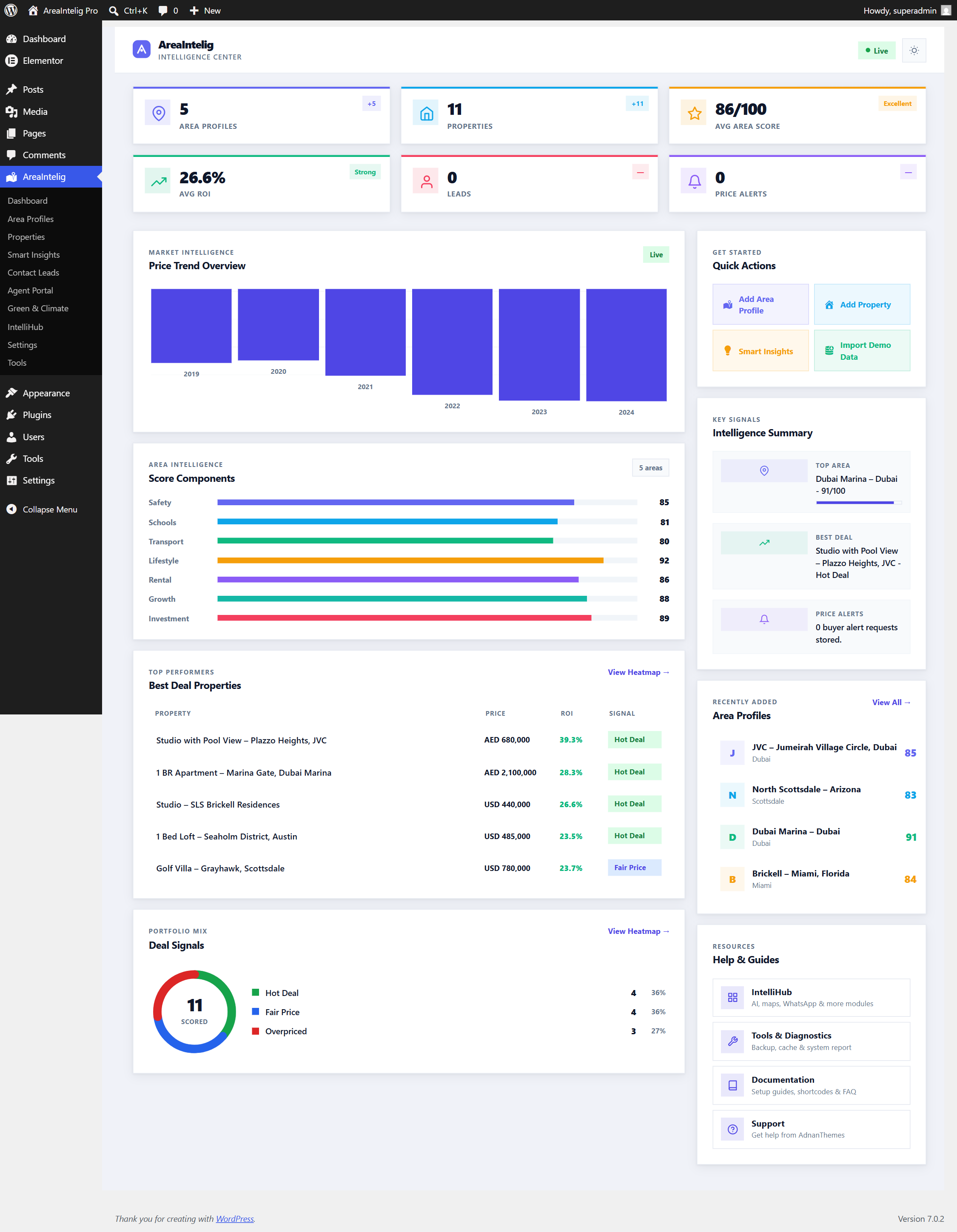
| Block | What it shows |
|---|---|
| KPI cards | Total properties, total area profiles, contact leads received, and how many listings currently carry a positive deal signal. |
| Charts | Lead volume over time and the distribution of deal signals across your listings, drawn by the plugin’s own canvas chart engine. |
| Quick actions | Shortcuts to add a property, add an area profile, import demo data, and open Settings. |
| Recent activity | The most recently added listings and the newest contact leads, each linking straight to its edit screen. |
| Resources | Links to this documentation and to support. |
Area Profiles
Area Profiles are the intelligence backbone of AreaIntelig. Every property you add should be linked to an Area Profile. The scores, nearby places, price trends, predictions, and Smart Assistant responses all come from the linked Area Profile.
Area Profile Builder — Sections
The Area Profile builder uses a tabbed layout with 4 tabs plus an All Sections view:
| Tab | Fields |
|---|---|
| 01 Basic Info | Area Title, Area Description, Area Image (URL or Media Library) |
| 02 Location | City, Country, Latitude, Longitude, Address/Neighborhood, Area Overview text |
| 03 Scores | Overall Score (0–100), Safety Score, Transport Score, Schools Score, Walkability Score, Amenities Score, Investment Score — each with optional description |
| 04 Places & Trends | Nearby Places (repeating: name, type, distance), Price Trends (repeating: period, average price, change %), Investment Notes, Future Development notes |
Score Visualization Example
[areaintelig_area id="X"]. Use it to embed the area profile view on any custom page.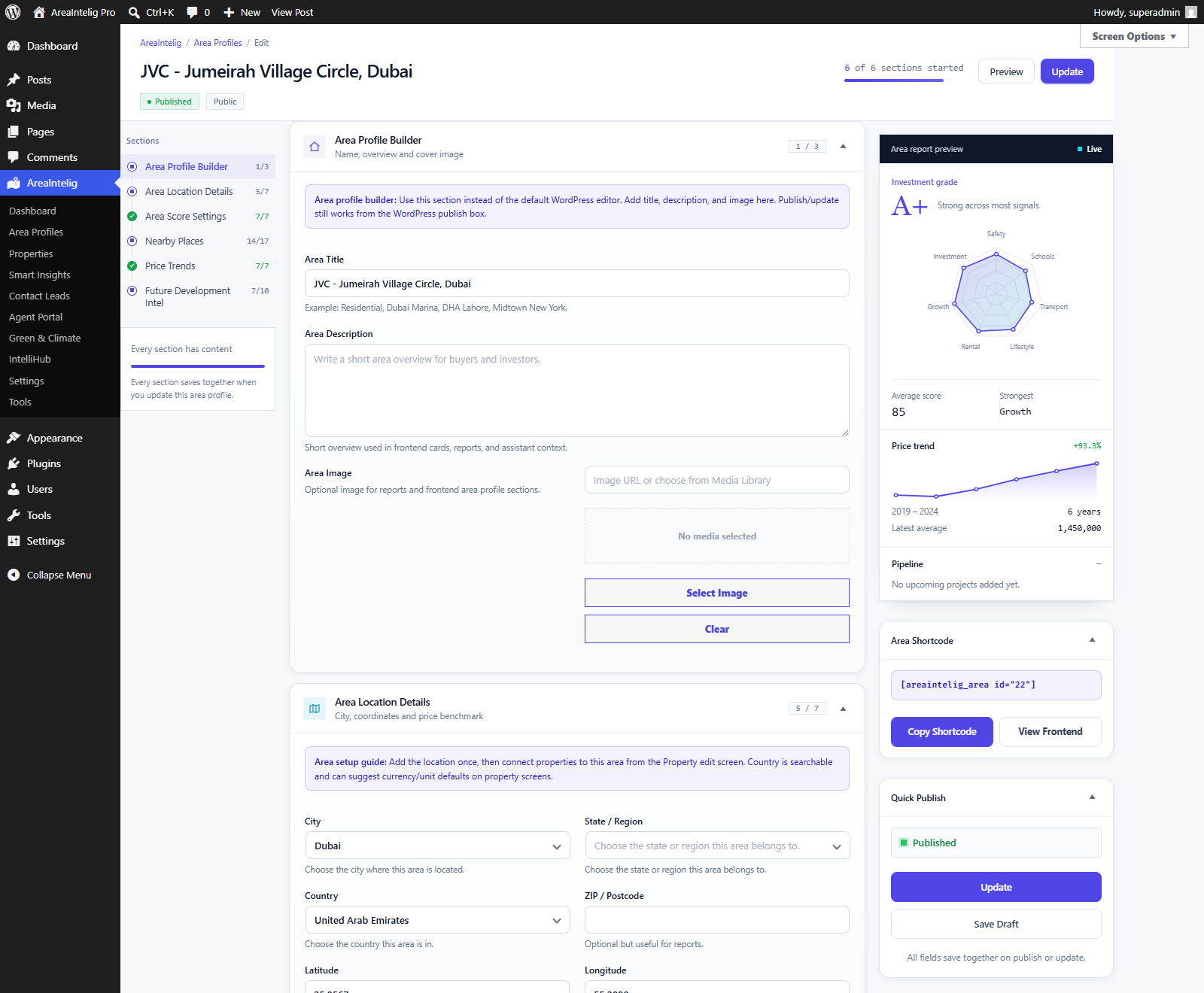
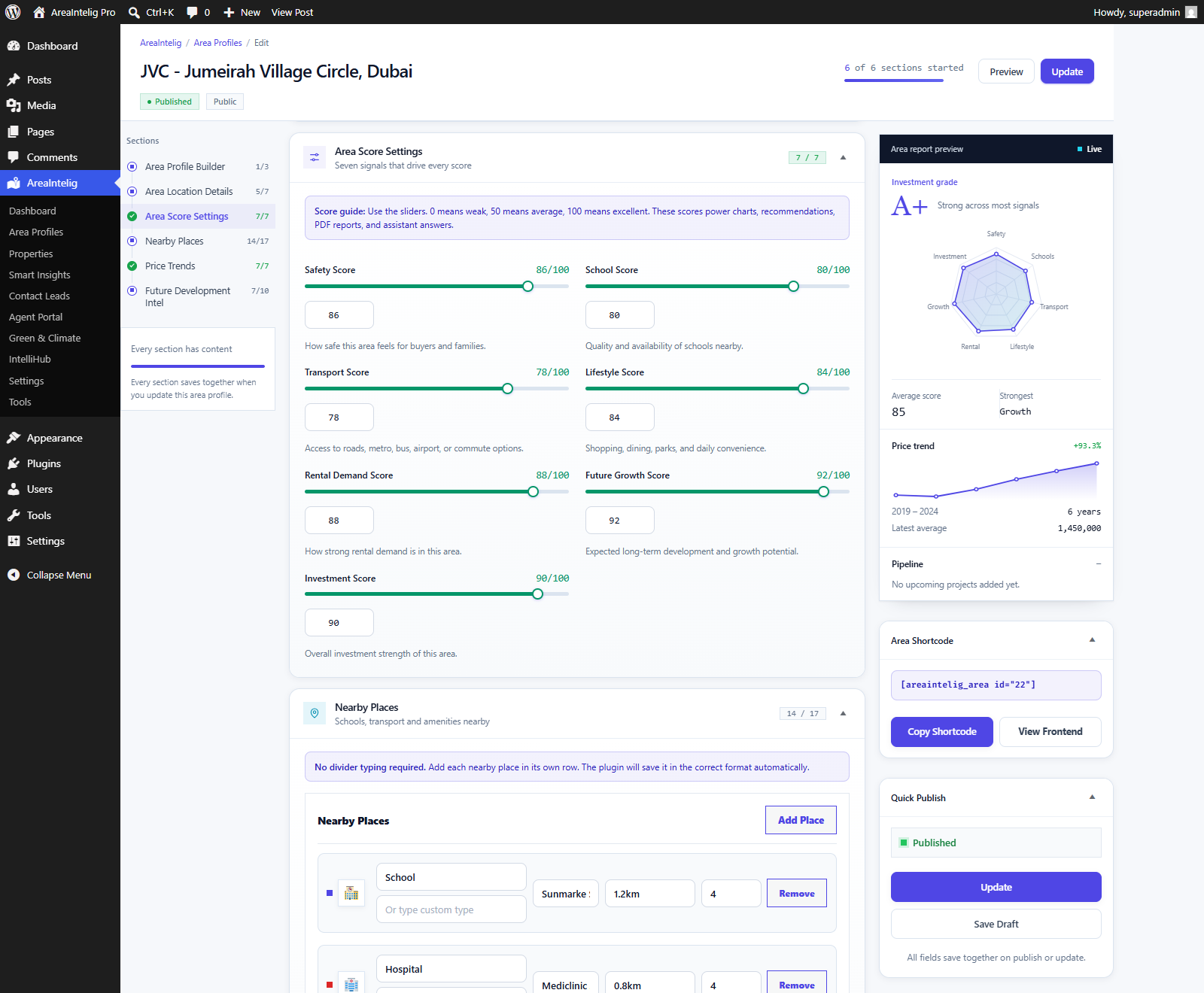
Properties
A Property is the core content type in AreaIntelig. Add one at AreaIntelig → Properties → Add New. Everything you enter here feeds the ROI engine, the deal score, the mortgage calculator and the frontend dashboard.
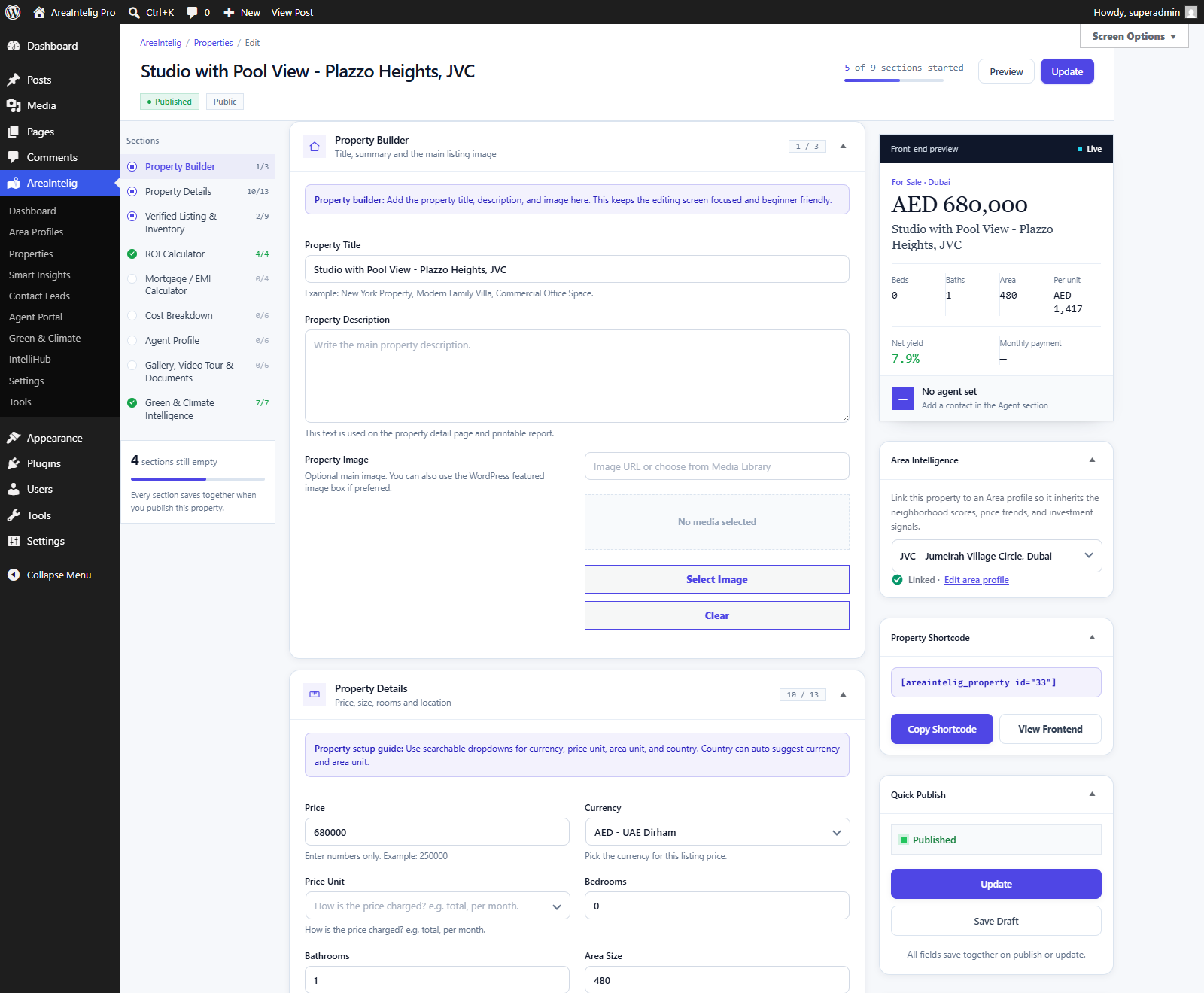
Field Groups
| Group | Fields |
|---|---|
| Basics | Title, description, featured image, property status (Available, Booked, Sold, On Hold, Coming Soon) |
| Price | Price, currency, price per unit area |
| Location | City, country, address, latitude, longitude |
| Size & Rooms | Area size, area unit (sqft / marla / sqm), bedrooms, bathrooms |
| Finance | Expected monthly rent, annual expenses, down payment percentage, loan term — these drive the ROI and payback calculations |
| Media | Gallery images and video URL |
| Agent | Agent name, phone, email, WhatsApp number |
| Area Intelligence | The sidebar box that links this property to an Area Profile — this is what unlocks area scores, nearby places and price trends on the property page |
Finance & ROI Output
From the finance fields AreaIntelig derives gross and net yield, payback period, a deal signal (Hot Deal, Fair Price or Overpriced), and an investment recommendation with a confidence percentage. None of this needs an external service — it is calculated on your server from your own numbers.
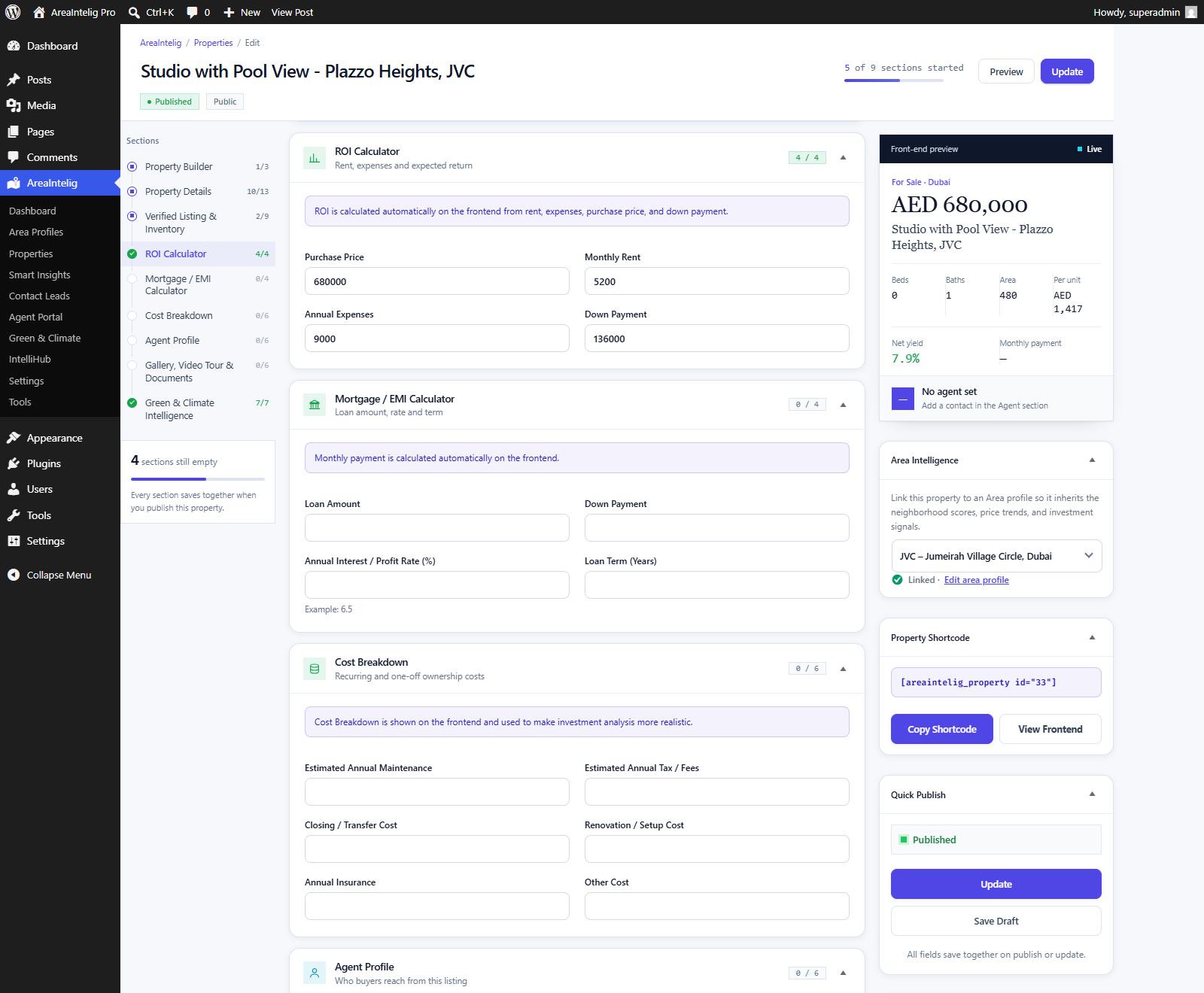
On the Frontend
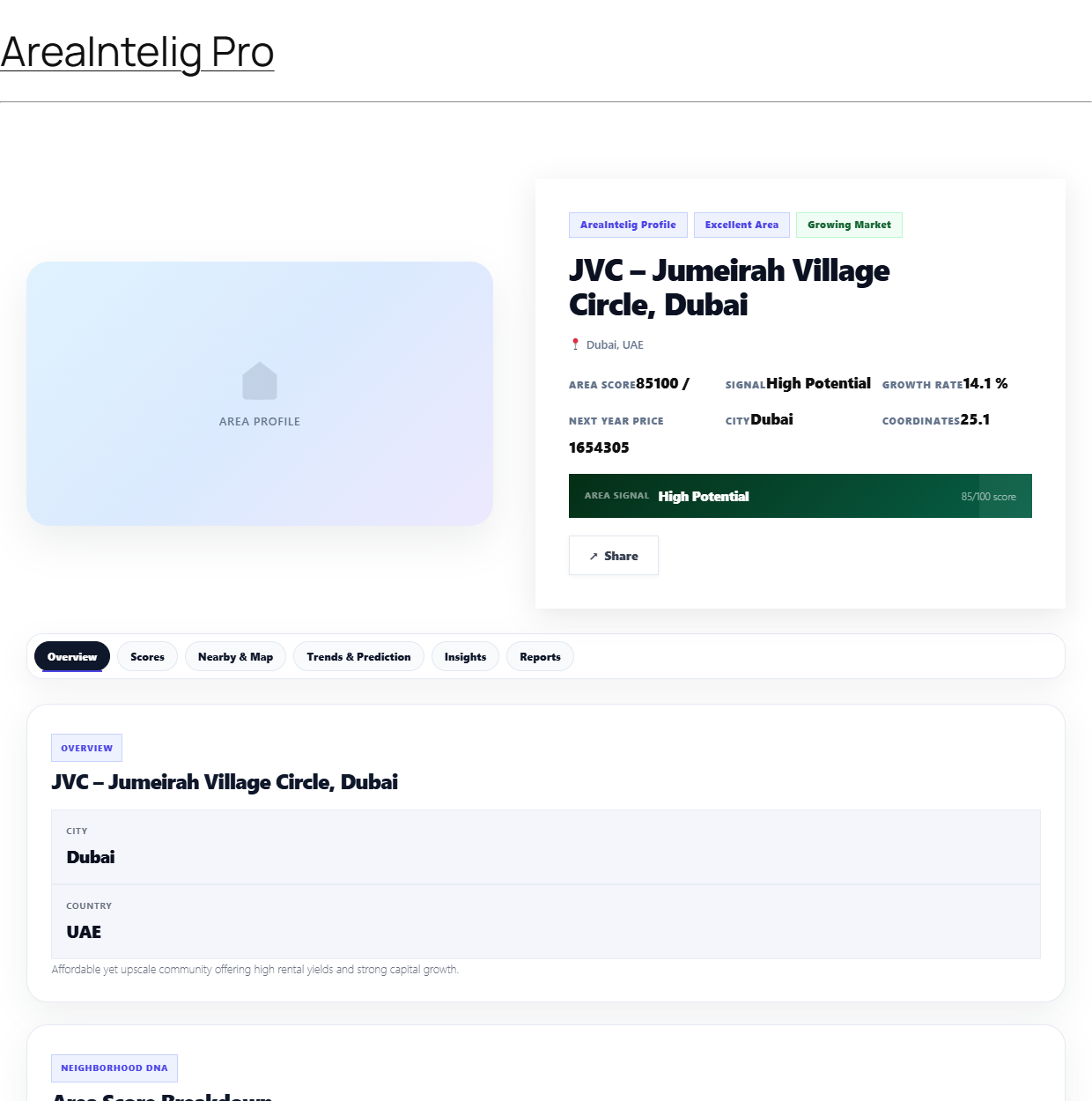
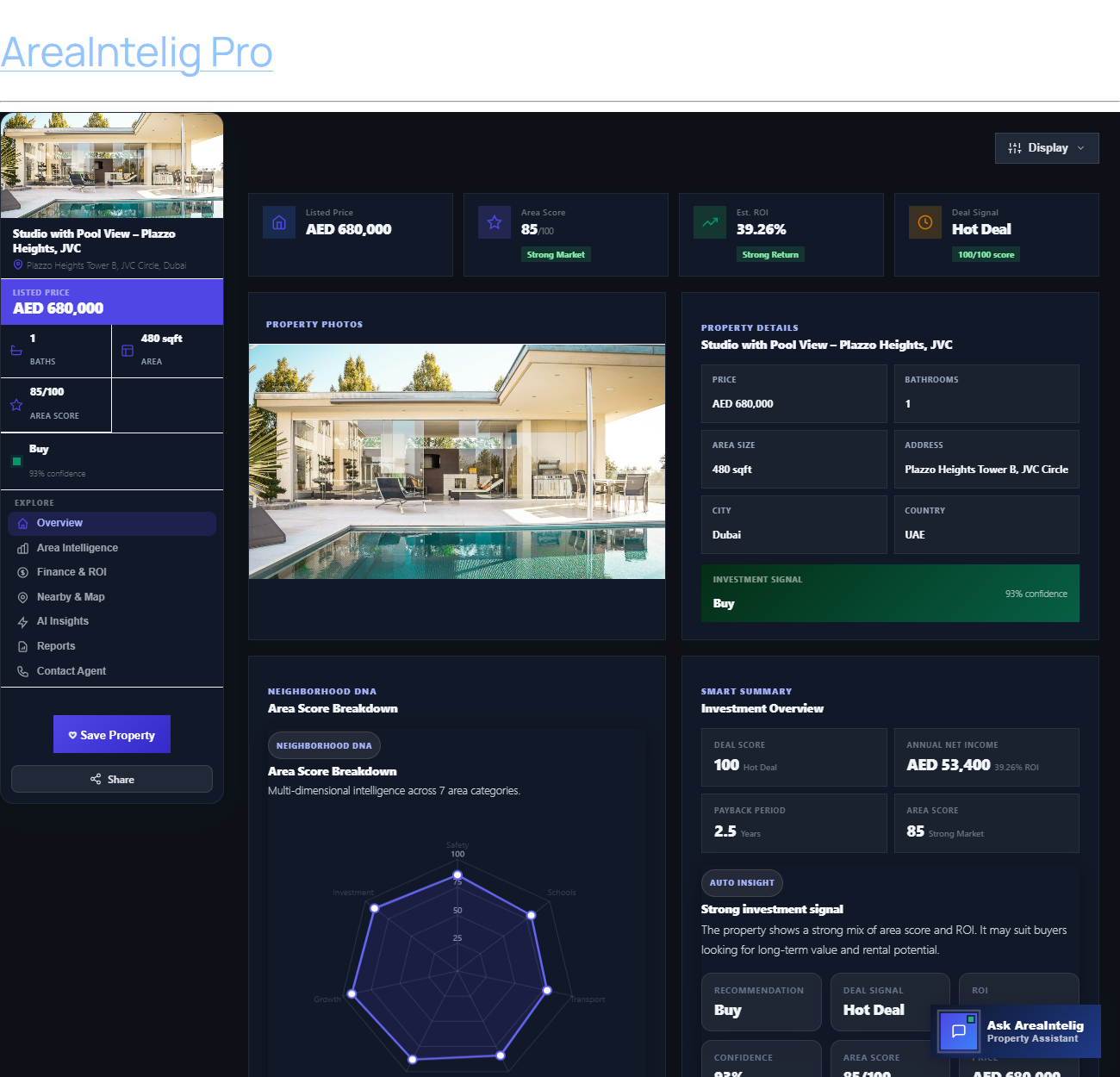
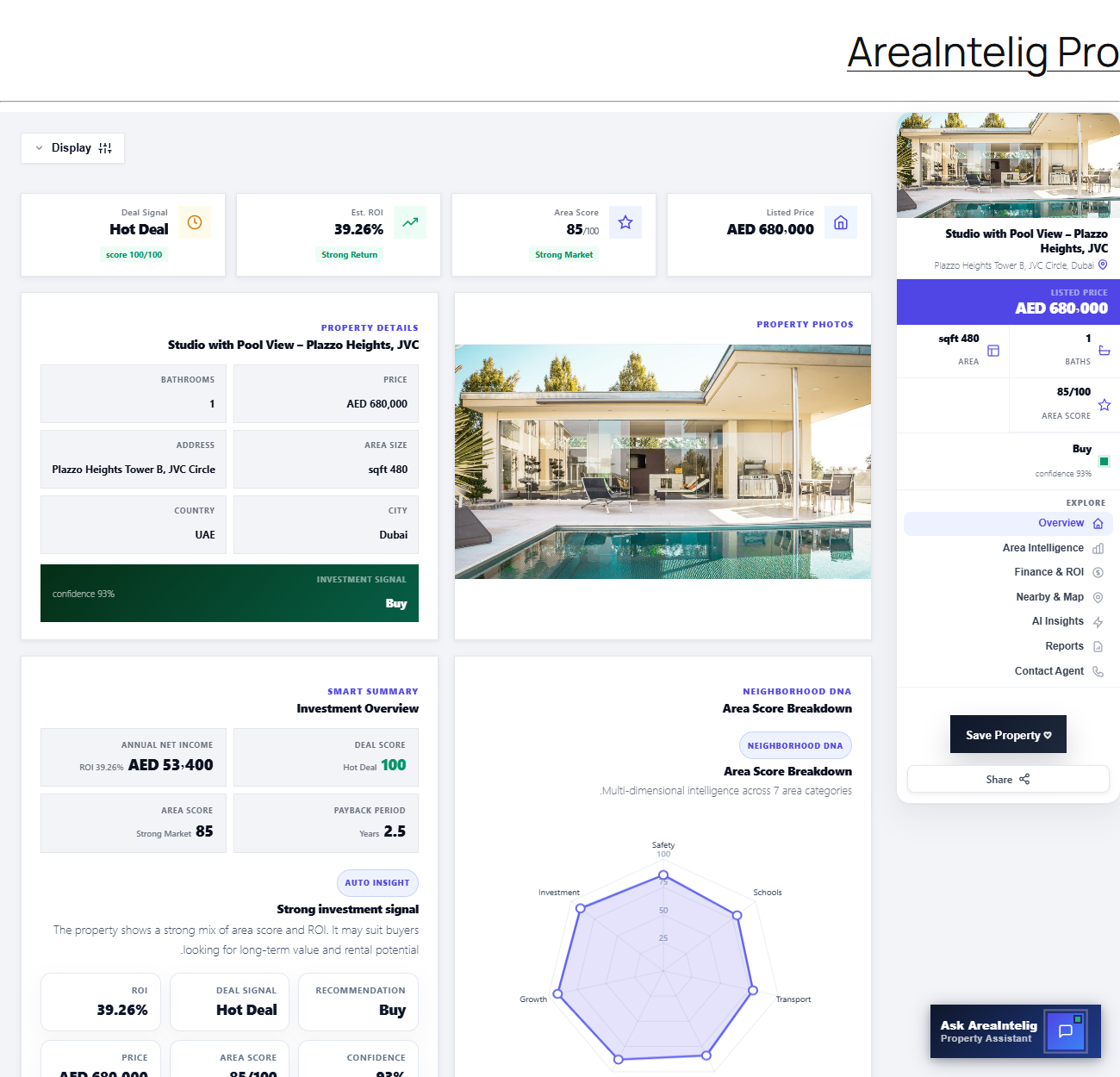
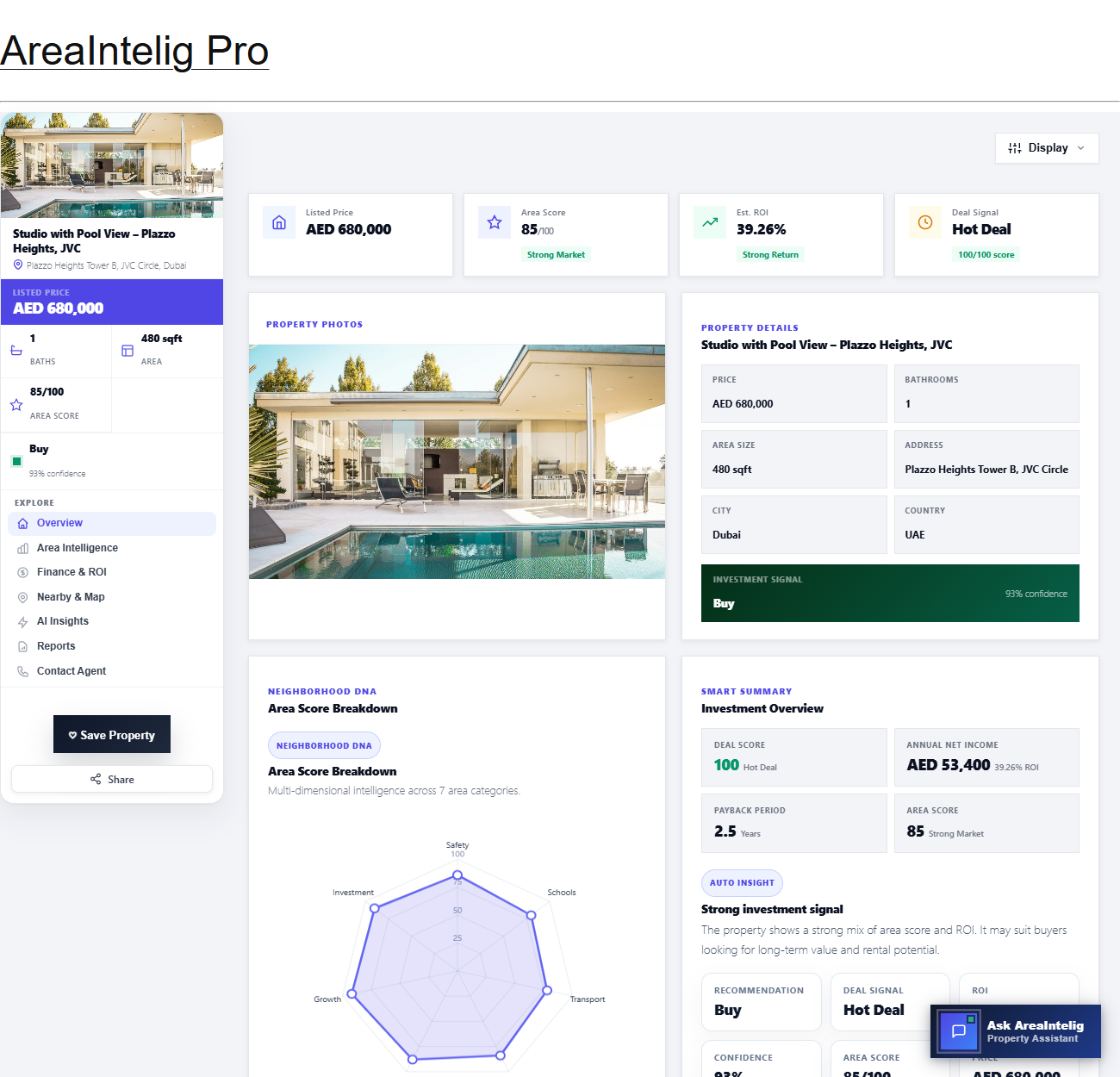
Publish the property and open its permalink. AreaIntelig automatically injects the full seven-tab dashboard — Overview, Area Intelligence, Finance & ROI, Nearby & Map, AI Insights, Reports and Contact Agent — with no shortcode required.
Bulk Import
To add many listings at once use AreaIntelig → IntelliHub → CSV Import. Download the supplied template, fill it in, and upload — up to 500 properties per run. Required columns are marked with an asterisk:
| Required | Optional |
|---|---|
| title, price, currency, city, country | bedrooms, bathrooms, area_size, area_unit, address, latitude, longitude, status, monthly_rent, down_payment, description |
Smart Insights
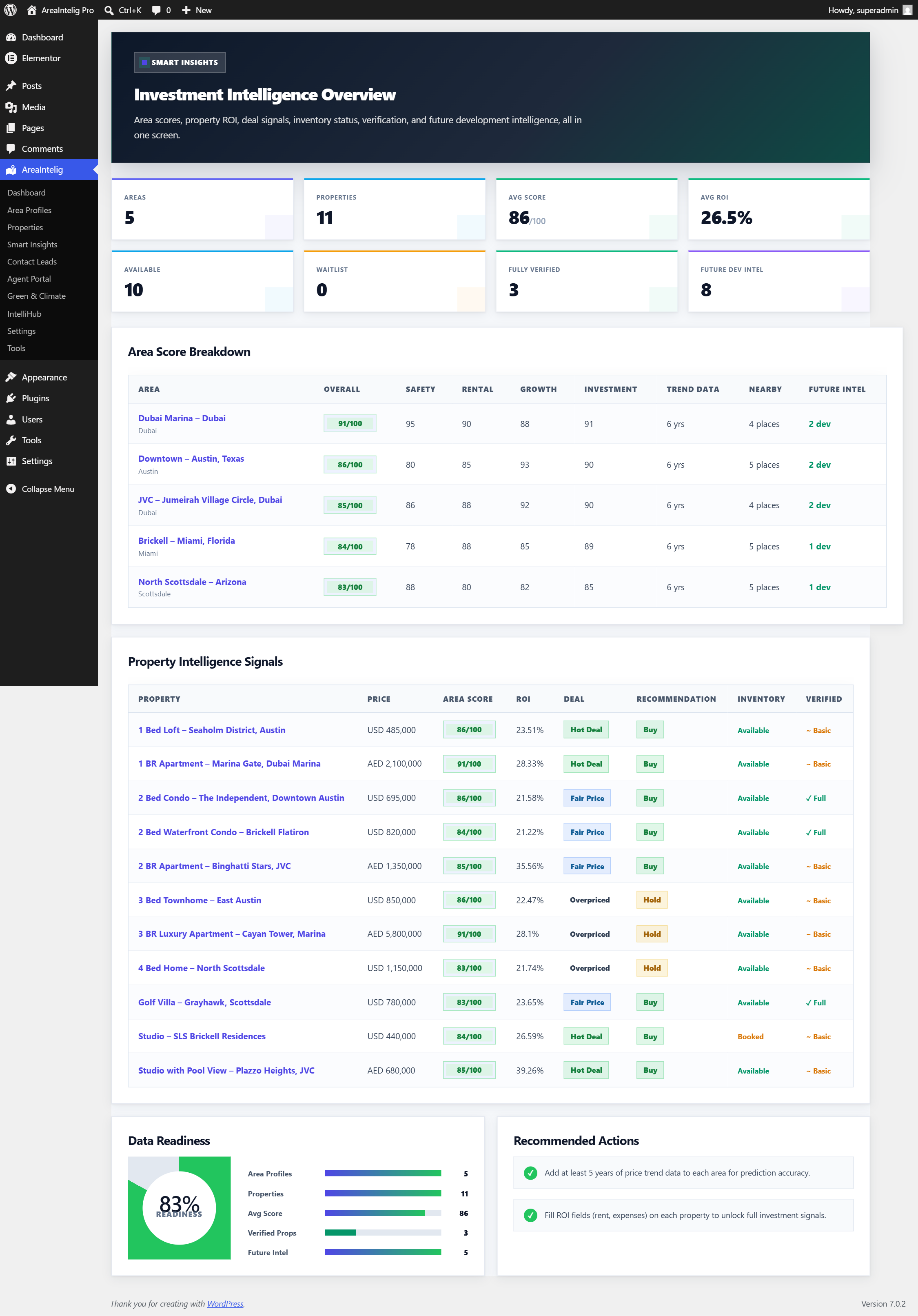
Smart Insights (AreaIntelig → Smart Insights) is the plugin's Investment Intelligence Overview: one admin screen that turns all of your Area Profiles and Properties into an at-a-glance analytics dashboard. Every figure is computed live from your own content, so the screen stays accurate as you add areas, list properties, and record leads.
What the Screen Shows
| Panel | What it shows |
|---|---|
| Investment Intelligence Overview (KPI cards) | Eight live metrics across the top: total Area Profiles, total Properties, average Area Score, average ROI, Available inventory, Waitlist count, Fully Verified listings, and Future Development milestones. |
| Area Score Breakdown | A ranked table of every area with its Overall score plus Safety, Rental, Growth and Investment scores, years of price-trend data, nearby-place count, and future-development entries. |
| Property Intelligence Signals | A ranked table of every property with its price, linked Area Score, ROI %, Deal signal (Hot Deal, Fair Price, or Overpriced), Buy / Hold / Avoid recommendation, inventory status, and verification level. |
| Data Readiness | A completion meter from 0 to 100% with progress bars for areas, properties, average score, verified properties and future intel, so you can see how complete your data is. |
| Recommended Actions | A smart checklist that reads your data and suggests the next best steps, such as adding verification documents, price-trend history, or ROI fields. |
IntelliHub — Advanced Integrations
IntelliHub is AreaIntelig's control center for optional advanced modules. Open it from AreaIntelig → IntelliHub. Every module here is optional and off by default — the core plugin is fully functional without any of them. Enable only what you need, and any module that contacts a third party does so only after you add your own credentials.
AI Assistant — Live AI Upgrade
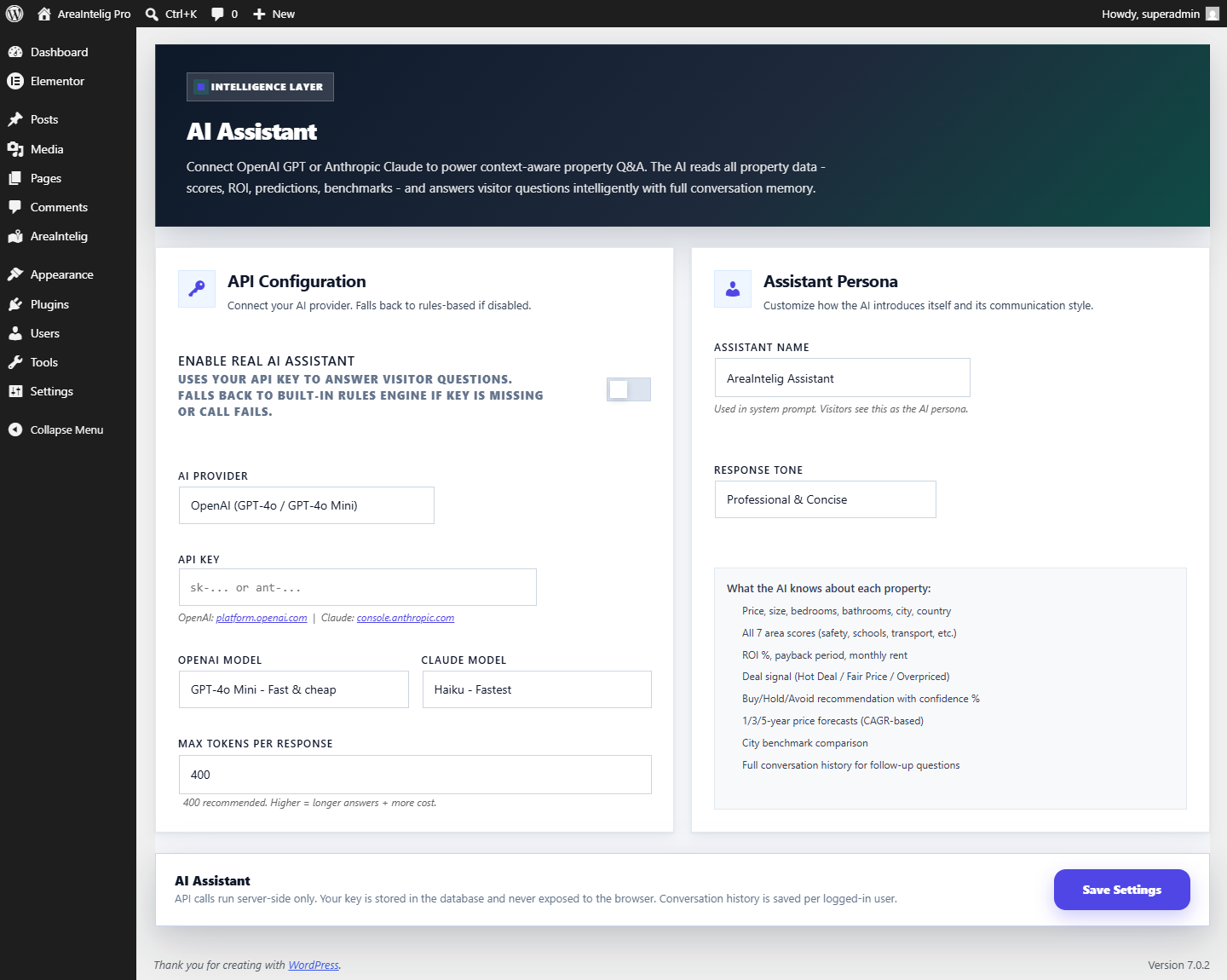
By default the Smart Assistant is fully rule-based (see the next section). In IntelliHub → AI Assistant you may optionally connect your own OpenAI or Anthropic (Claude) API key to upgrade it to live generative answers. You choose the provider, model, system prompt, and a per-visitor hourly rate limit that protects your API budget. If the key is missing, the hourly limit is reached, or the provider call fails, the assistant automatically falls back to the free rule-based engine — visitors never see an error. Your key is stored masked and is never sent anywhere except the provider you selected.
WhatsApp Alerts
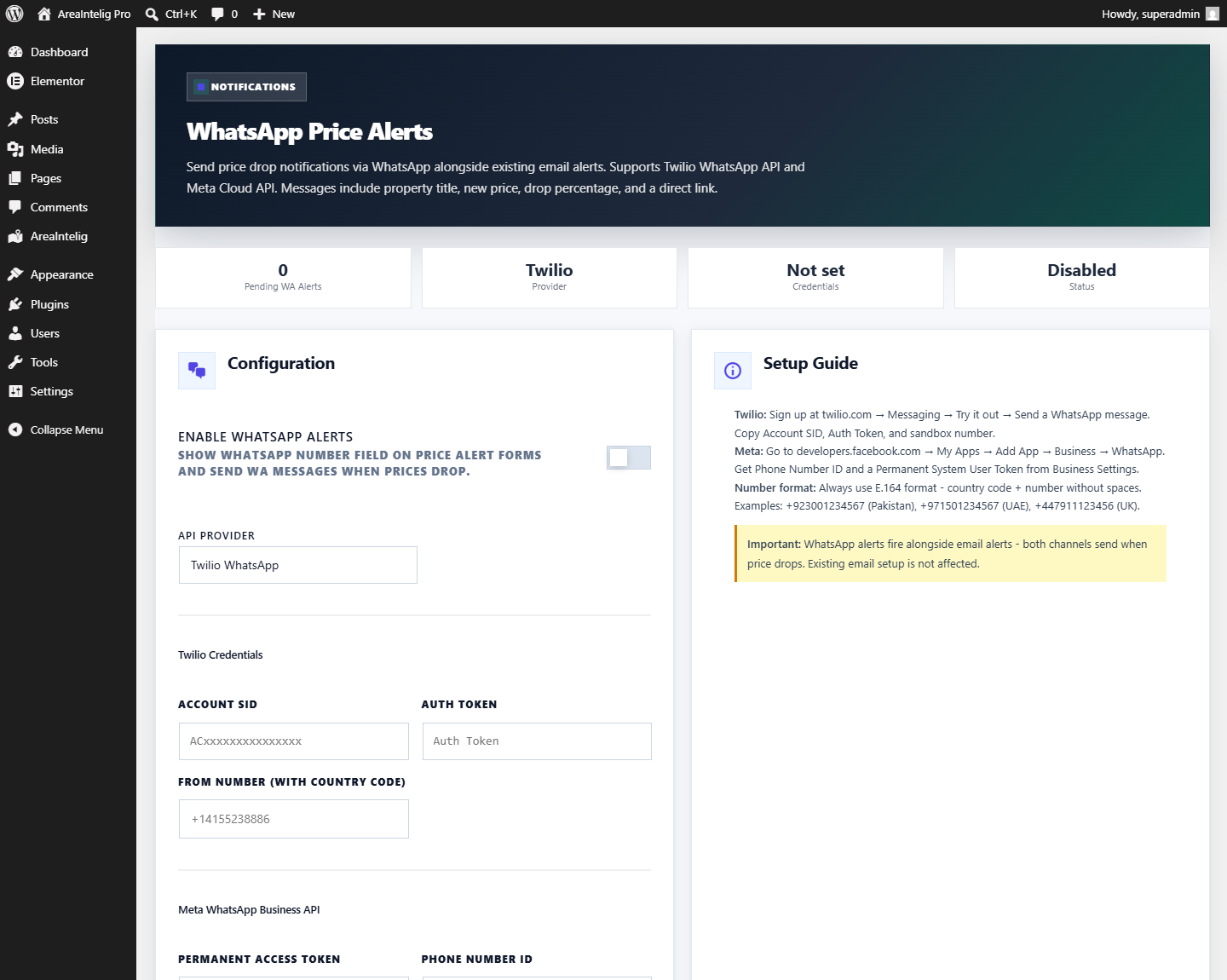
Deliver property price-drop alerts over WhatsApp using Twilio or the Meta WhatsApp Cloud API. Enter your credentials and sender number, and AreaIntelig sends a WhatsApp message (in addition to email) when a watched property's price drops to a visitor's target. Disabled until you add credentials.
Google Maps
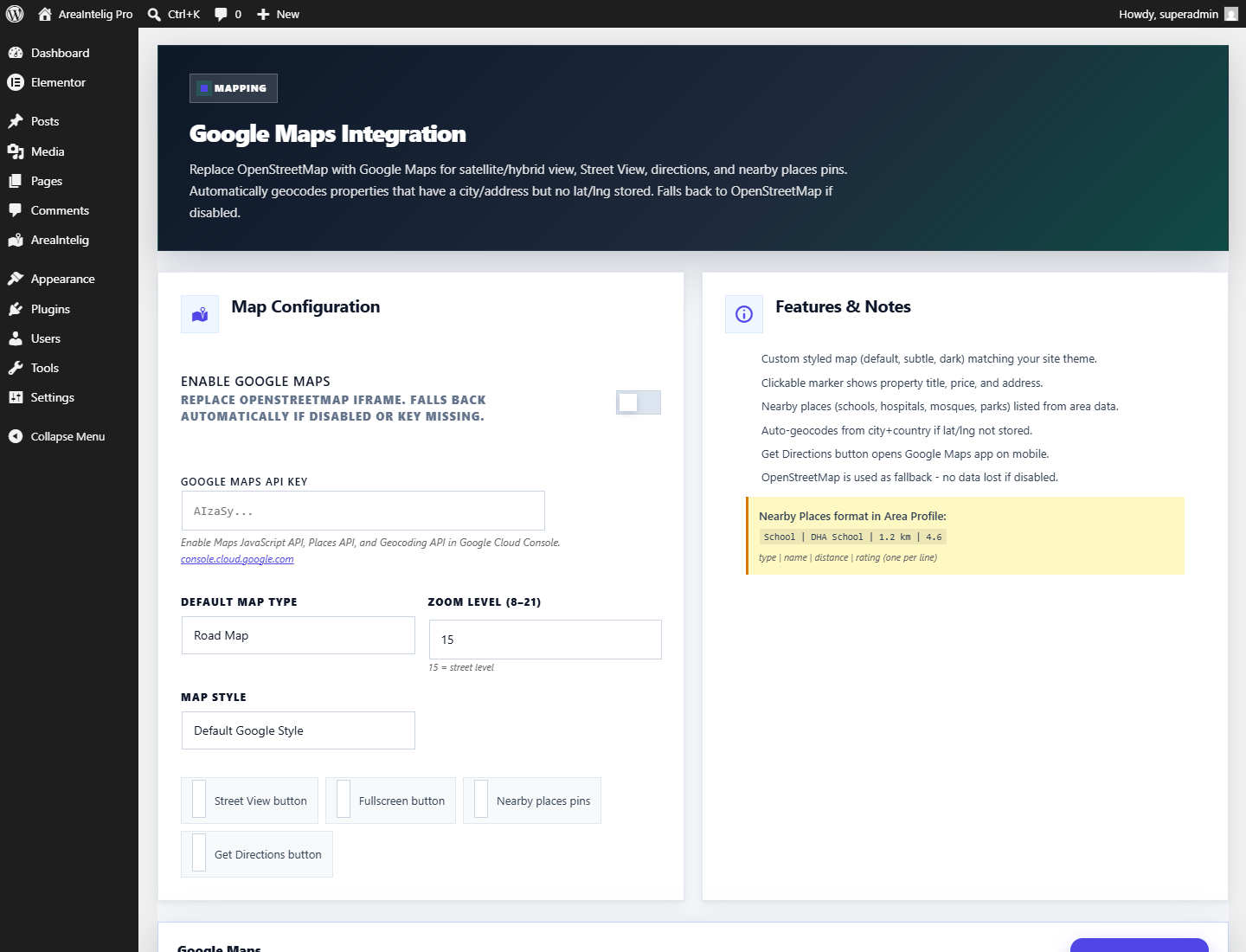
AreaIntelig uses free, key-less OpenStreetMap for all maps by default. If you prefer Google's tiles, add a Google Maps Platform API key here to enable satellite / Street View and address geocoding in the visitor's browser after map consent. Restrict the key by HTTP referrer in Google Cloud Console to protect your quota.
Mobile App (PWA)
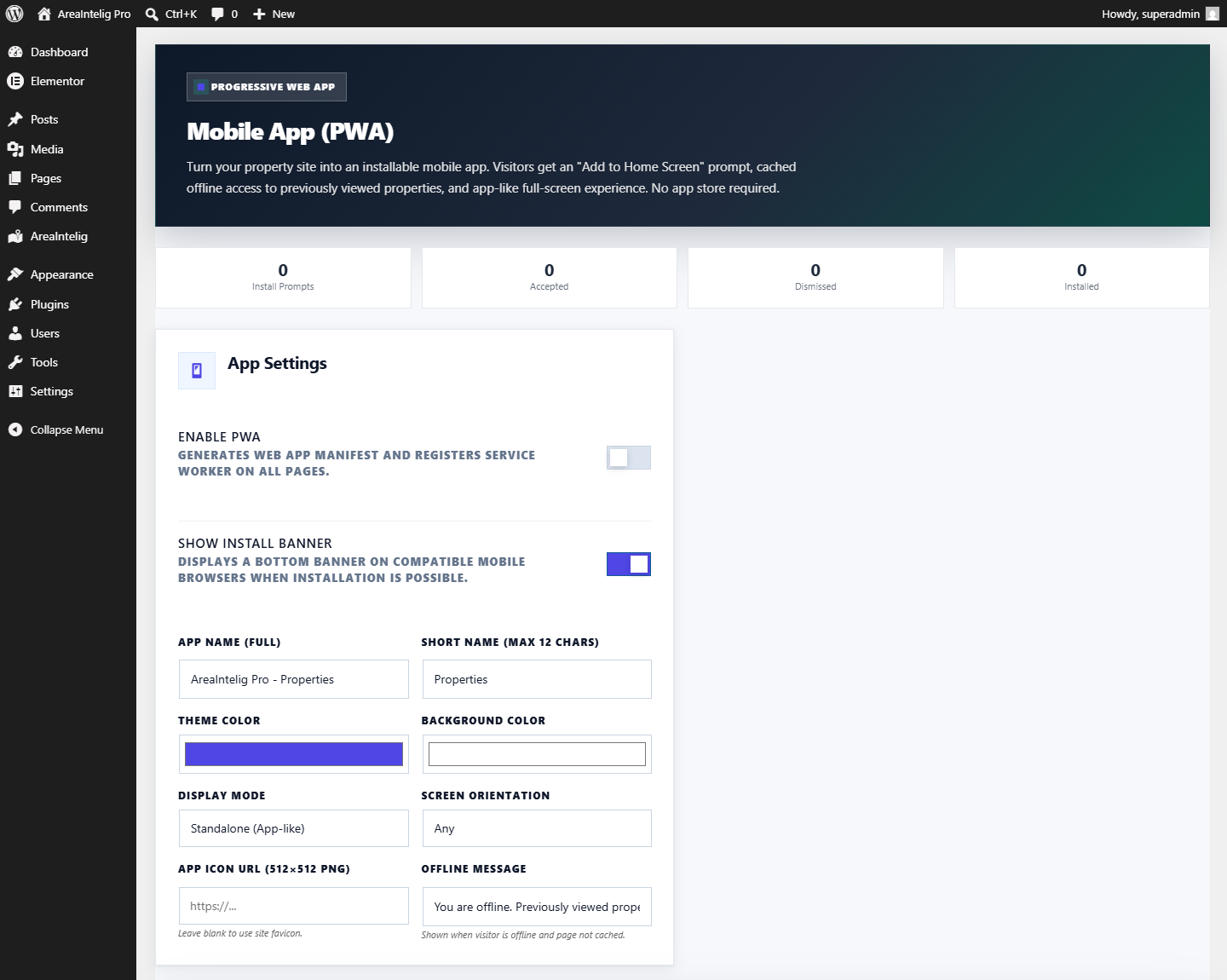
Turn your real estate site into an installable Progressive Web App. When enabled, visitors see an Install App button and can add your site to their home screen for a full-screen, offline-capable app experience. Configure the app name, short name, theme color, and icon. AreaIntelig generates the web manifest and service worker automatically.
Saved Searches
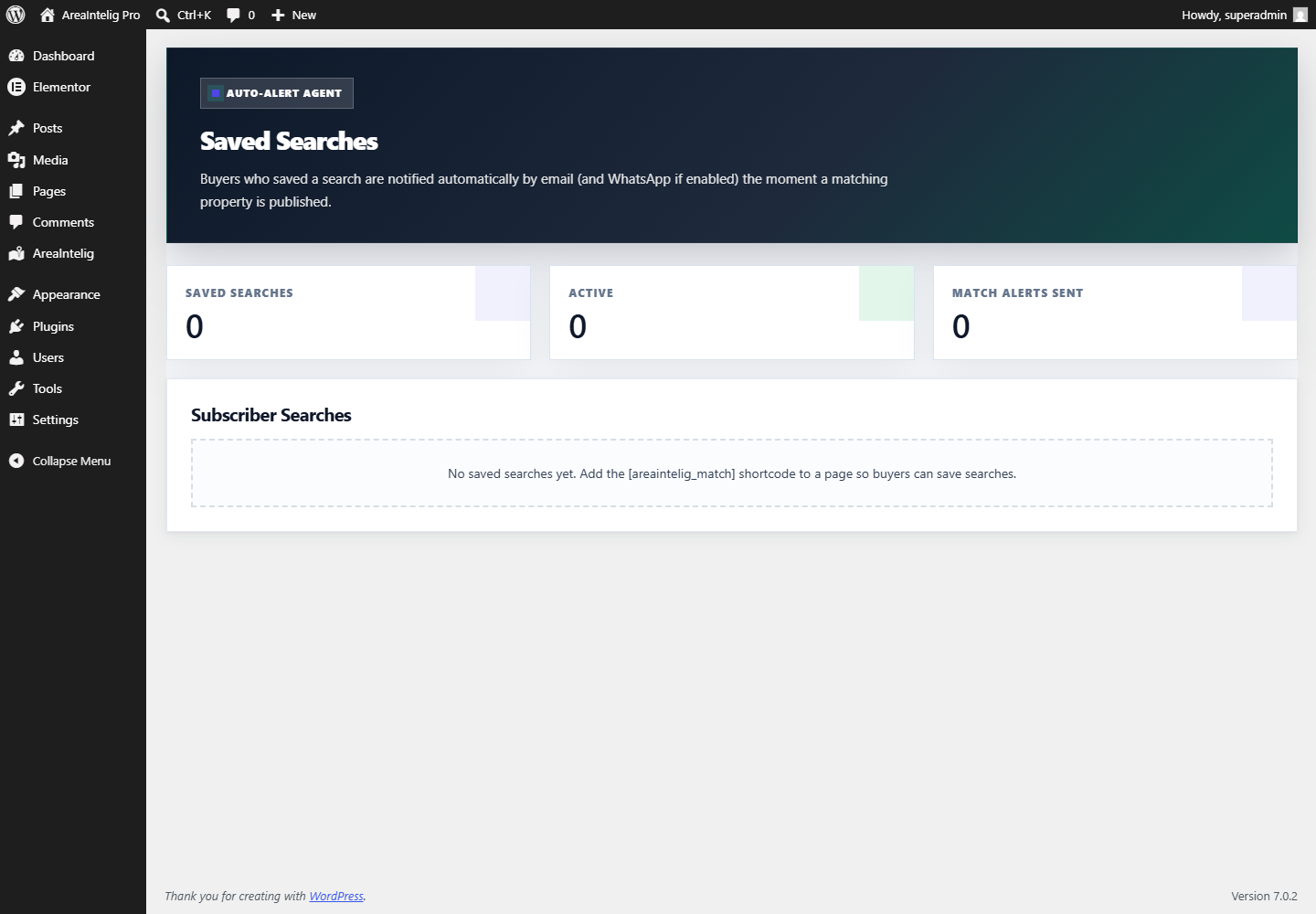
Visitors can save a property search by entering their email. AreaIntelig runs a daily background check and emails them when a newly listed property matches their saved criteria. Manage every saved search from this screen. Saves are rate-limited (5 per email per day) to prevent abuse.
More Modules
| Module | What it does |
|---|---|
| Agent Performance | Analytics dashboard ranking agents by listings, leads, and conversion — with charts. |
| Buyer Heatmap | Visual heatmap of where buyer interest and saved-property activity is concentrated. |
| CSV Import | Bulk-import properties and area profiles from a CSV file, with column mapping. |
| Inventory Manager | Live inventory status (Available / Reserved / Sold) with optional waitlist capture. |
| Booking | Optional WooCommerce-powered "Book a Visit" flow for paid or free viewing appointments. |
| Demo Importer | One-click sample data so you can explore every feature immediately after install. |
[areaintelig_inventory_badge], [areaintelig_book_visit], [areaintelig_wa_share]) listed in the Shortcodes reference, so you can place their frontend widgets on any page.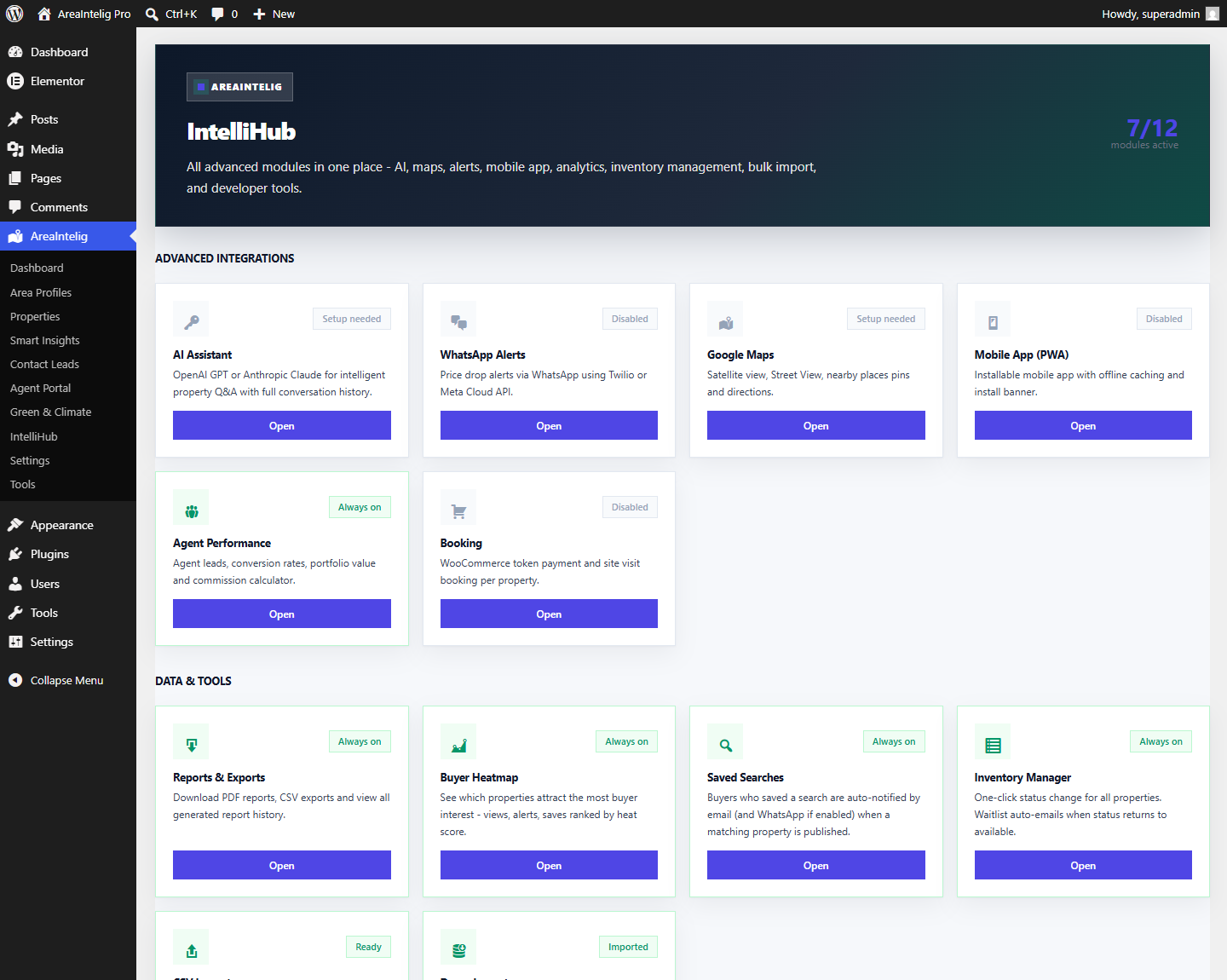
Smart Assistant
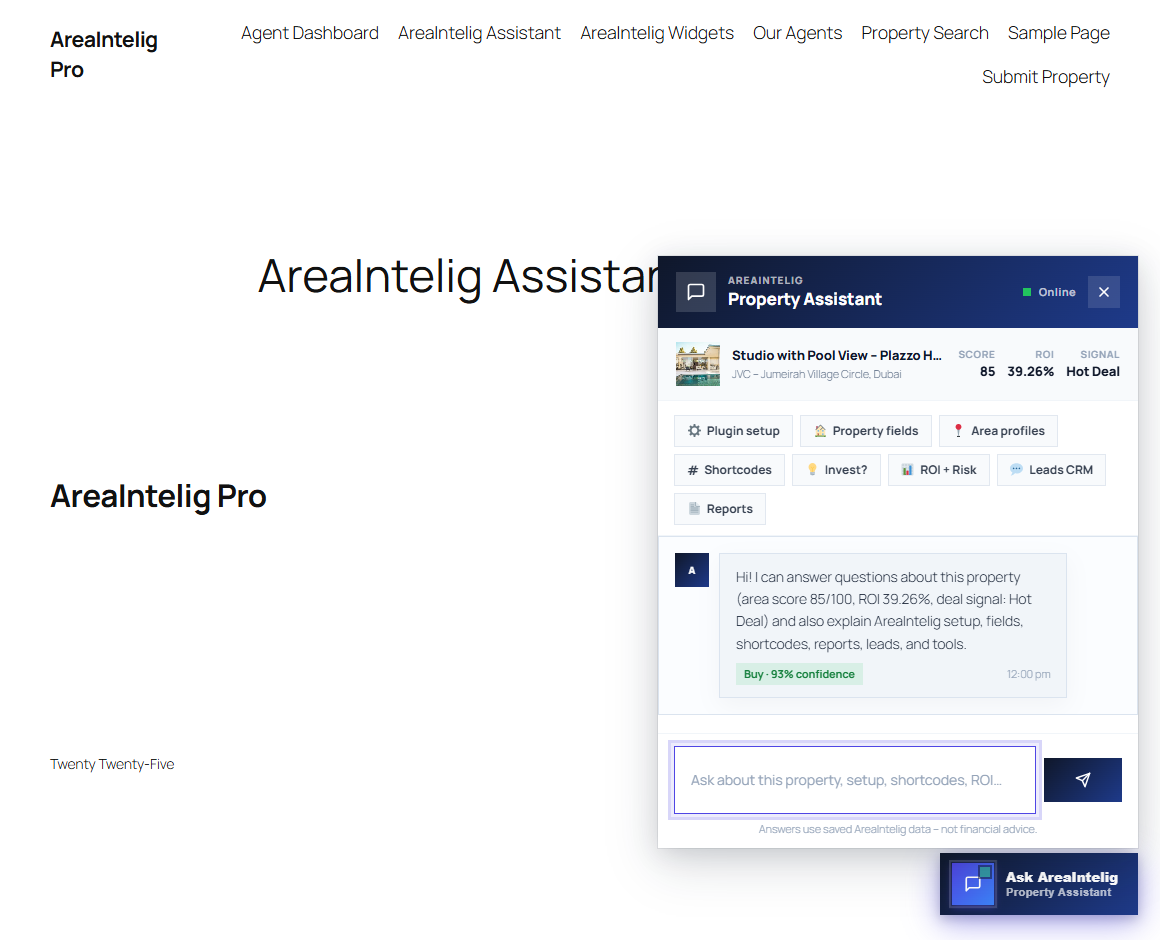
The AreaIntelig Smart Assistant is a rule-based intelligent assistant embedded on property pages. It answers questions about the property, the linked area, ROI, risk level, deal score, nearby places, and plugin setup — all from data you save in the plugin.
What Visitors Can Ask
🏠 Property Questions
Price, currency, bedrooms, bathrooms, area size, address, listing status, deal score, and investment grade.
🗺 Area Questions
Overall area score, safety, schools, transport, walkability, amenities, and investment score.
💰 Finance Questions
Annual ROI %, gross yield, net yield, estimated mortgage payment, down payment, and cost breakdown.
📍 Nearby Questions
Schools, hospitals, supermarkets, transport stops, parks, and other nearby places with distances.
Assistant Settings
The Smart Assistant has configurable options under AreaIntelig → Settings → Assistant:
| Setting | Description |
|---|---|
| Enable Assistant | Show or hide the assistant widget globally on all property pages. |
| Assistant Name | The display name shown in the chat widget header (e.g. 'Alex', 'AreaIntelig Assistant'). |
| Welcome Message | The first message the assistant shows to visitors when they open the chat. |
| Show on Area Pages | Whether to also show the assistant on Area Profile single pages. |
Contact Leads CRM
Every submission from the frontend Contact Agent form is stored as a manageable lead at AreaIntelig → Contact Leads. Nothing is emailed away and lost — each enquiry stays in WordPress where you can work it.
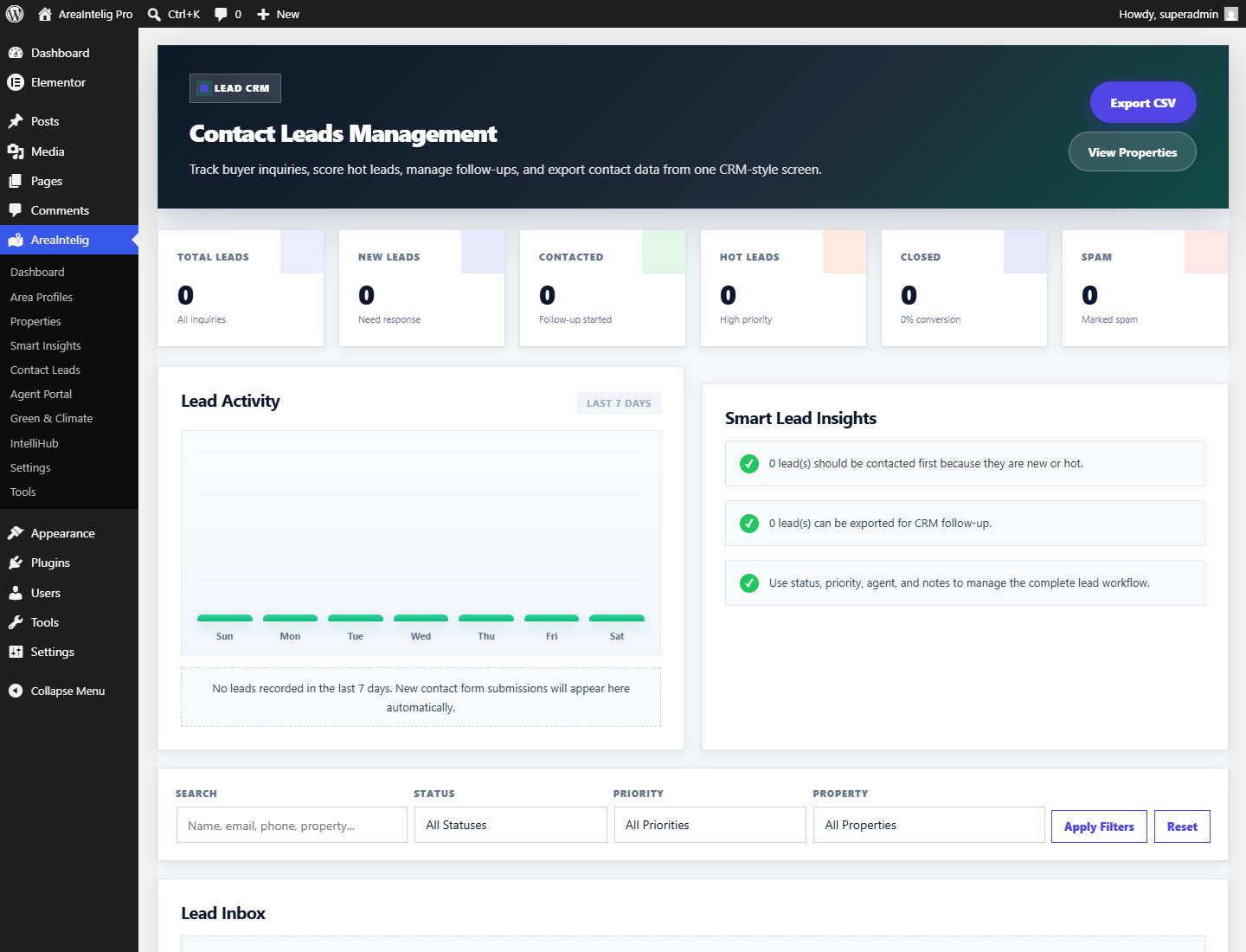
| Capability | Detail |
|---|---|
| Captured fields | Name, email, phone, message, the property enquired about, and the submission timestamp |
| Status pipeline | New → Contacted → Qualified → Closed, changed inline from the list |
| Reply | Send a reply straight from the admin screen; it goes out through WordPress mail |
| Delete | Remove a lead permanently — useful for spam or for data-erasure requests |
| CSV export | Export the full lead list for your own CRM or spreadsheet |
Reports & Exports
AreaIntelig → IntelliHub → Reports & Exports turns your data into something you can hand to a client, a partner or an accountant.
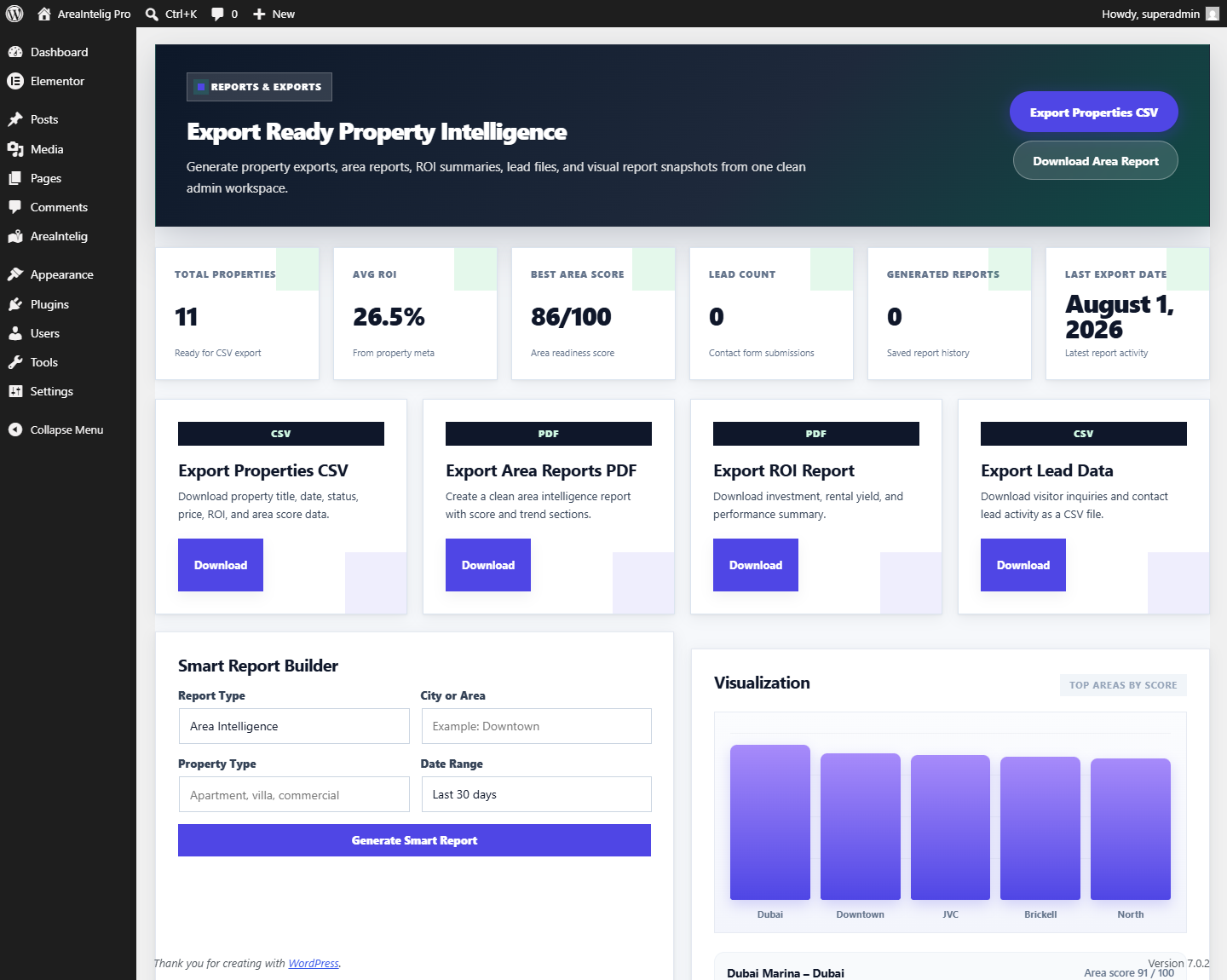
| Output | Contents |
|---|---|
| Area report | Area scores, nearby places and price trend summary for a chosen area |
| ROI report | Yield, payback and deal signal across your listings |
| Trend report | Price movement and forecast summary |
| Properties CSV | ID, title, status, date, price, ROI and area score for every listing |
| Leads CSV | Name, email, phone, property, message and date for every enquiry |
PDF and print-ready HTML
Reports download as PDF using the plugin’s own built-in writer — no external PDF service and no extra library. That writer uses a Helvetica base font, which cannot draw Arabic, Hebrew, Urdu, Hindi, Cyrillic or CJK characters. Rather than silently dropping those characters, AreaIntelig detects them and serves a print-ready HTML report instead, which your browser renders correctly in any script and can save as PDF via Print → Save as PDF.
Visitor-facing reports
Visitors get their own printable report from the Reports tab on any property page, and logged-in users can review what they generated before through [areaintelig_report_history].
Page Builders
AreaIntelig works with the WordPress block editor, WPBakery and Elementor. Support differs between them, so this section states exactly what each one gives you.
Gutenberg / Block Editor
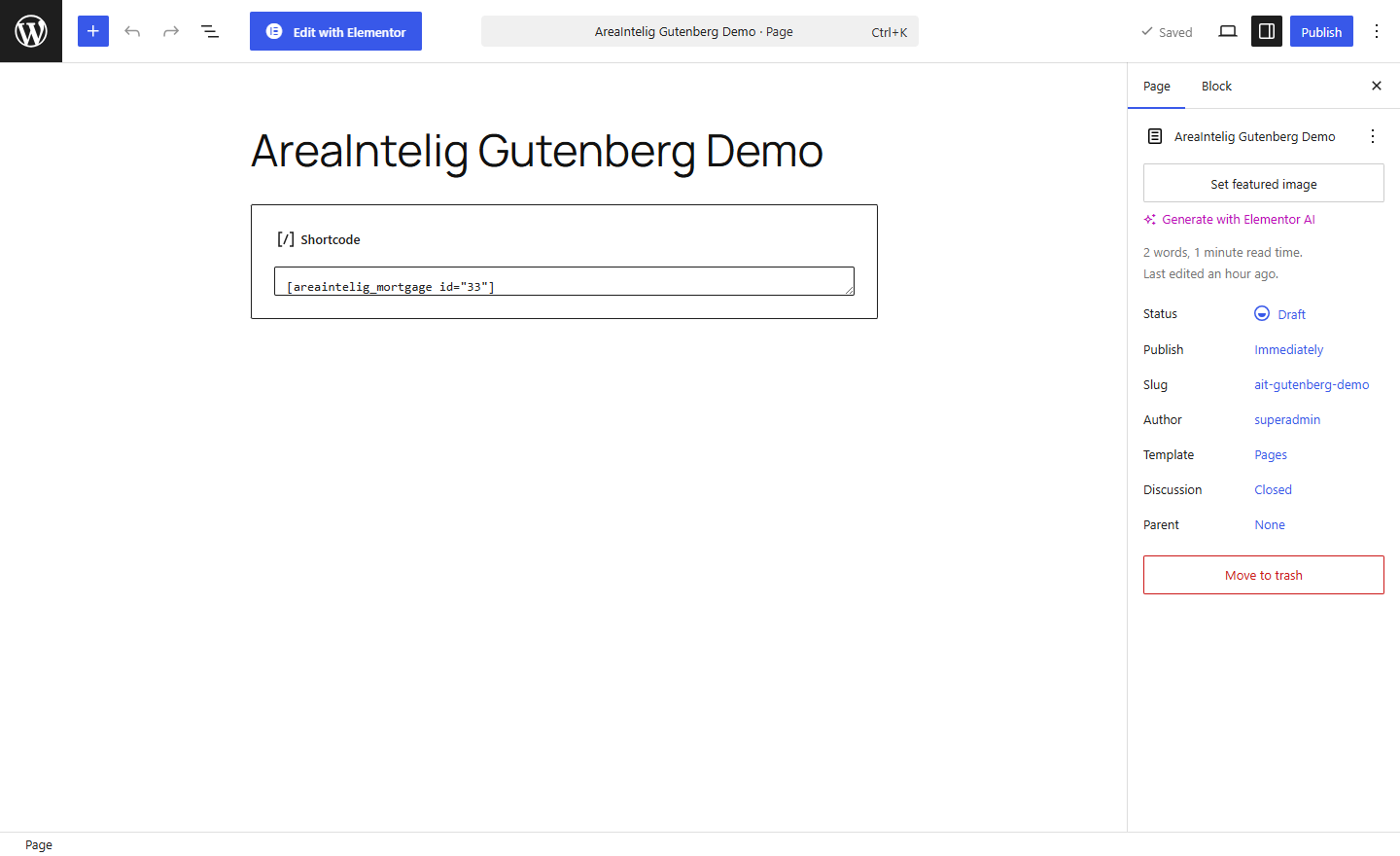
AreaIntelig registers a dynamic block called AreaIntelig Module. Insert it, pick any of the 67 shortcodes from a dropdown, set the target property or area ID, and the block renders live in the editor.
WPBakery Page Builder
WPBakery gets 13 native draggable elements under their own “AreaIntelig” category: Property Dashboard, Area Profile (full), Area Score Radar, ROI Calculator, Mortgage Calculator, Price Trend Chart, Price Prediction, Location Map, Smart Search, Area Comparison, AI Property Match, AI Assistant and Currency Converter.
Elementor
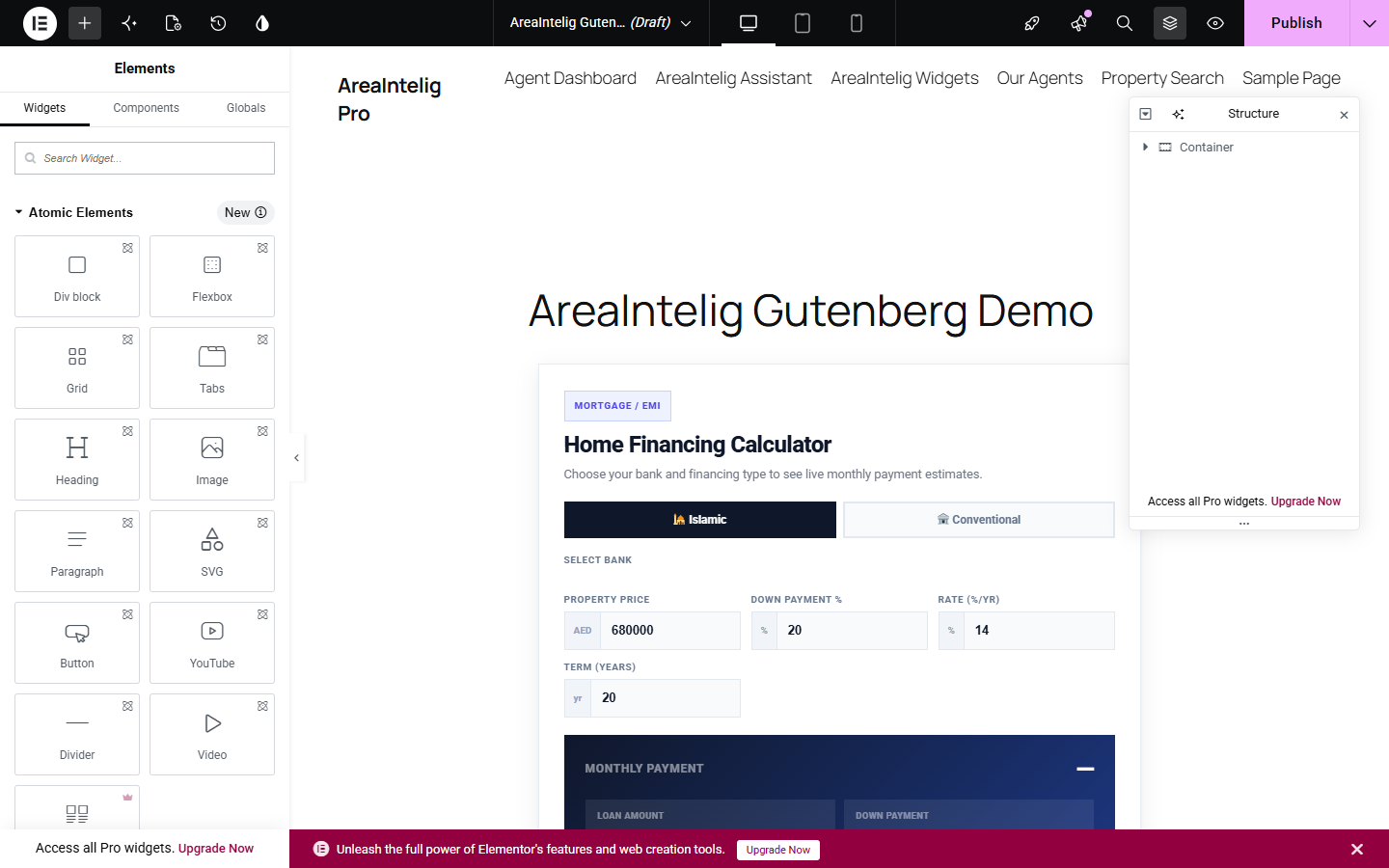
No builder at all
You do not need a page builder. Single property and single area pages render the full dashboard automatically, and any shortcode can be pasted into the classic editor or a text widget.
Settings
AreaIntelig → Settings holds the global options that apply across the whole plugin. Set these before you add content so new listings inherit the right defaults.
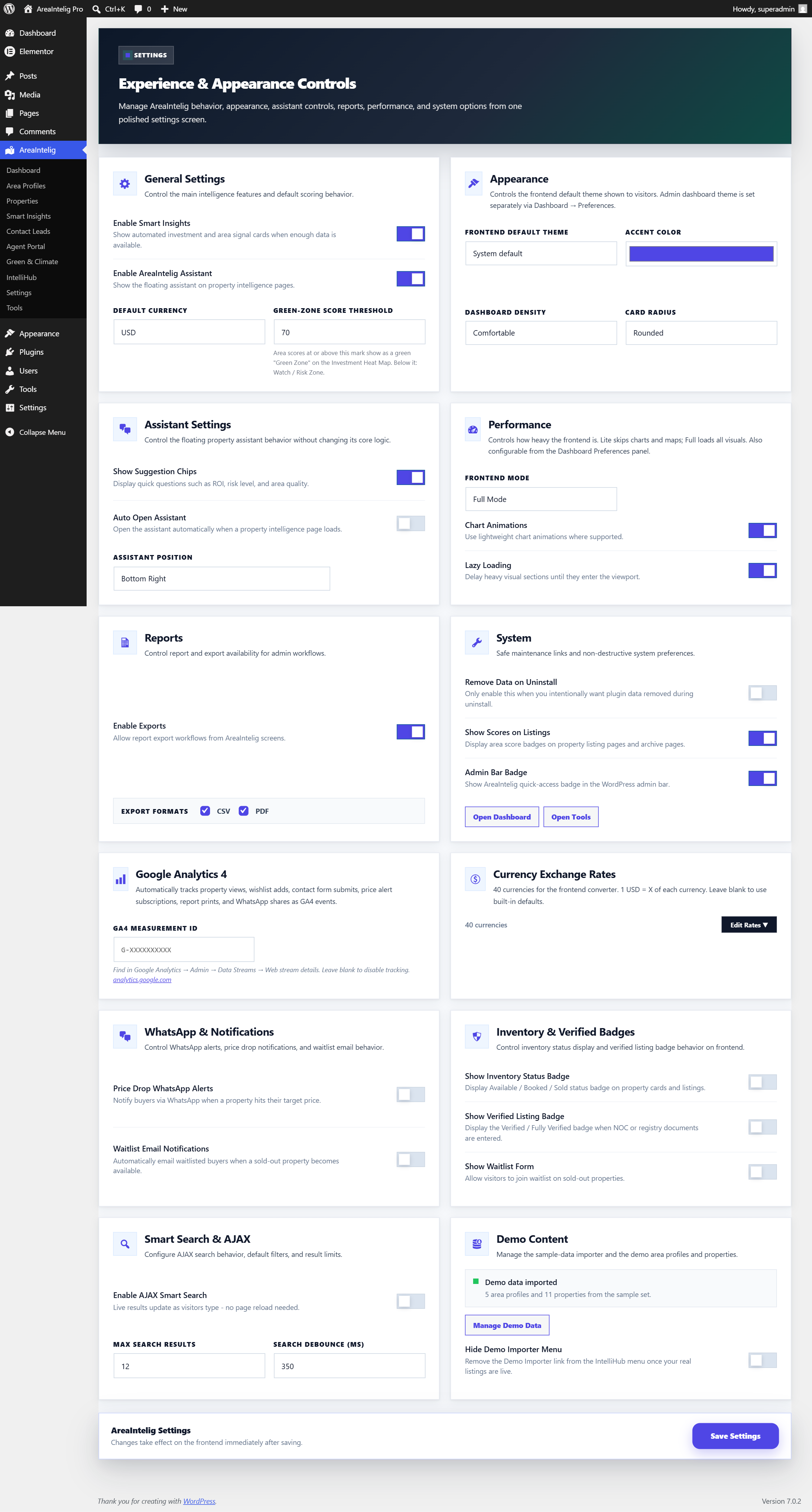
| Setting | What it controls |
|---|---|
| Default currency | The currency used for prices, ROI figures and mortgage output when a listing does not specify its own. |
| Accent colour | The highlight colour used across frontend cards, charts, badges and buttons. |
| Default appearance | Whether the frontend starts in System, Light or Dark mode. Visitors can still switch. |
| Smart Assistant | Enable or disable the assistant on property pages. |
| AJAX search | Enable or disable the live smart-search behaviour. |
| Smart Insights | Show or hide the investment-intelligence screen and its frontend output. |
| Exports | Master switch for CSV and report downloads. Turning it off blocks the export endpoints entirely. |
| Admin bar badge | Show a quick AreaIntelig indicator in the WordPress admin bar. |
| Demo content | Hide the Demo Importer once you are on a live site, so nobody imports sample listings by accident. |
| Delete data on uninstall | Off by default. When left off, deleting the plugin preserves all your properties, areas, leads and settings. |
Tools
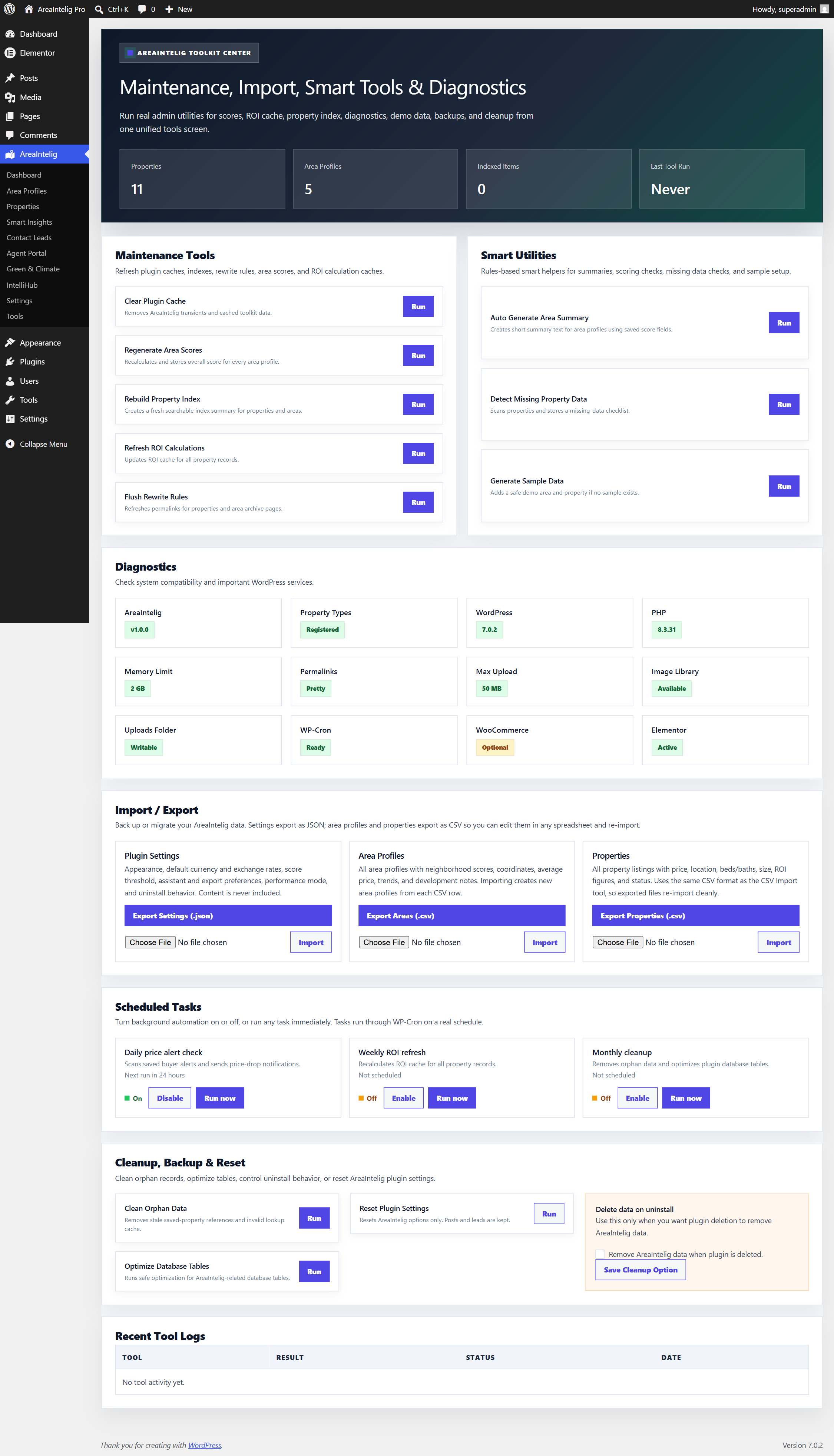
Go to AreaIntelig → Tools to access maintenance, diagnostics, backup, and cleanup utilities.
| Tool | Description |
|---|---|
| Maintenance Tools | |
| Clear Plugin Cache | Removes AreaIntelig transients and cached toolkit data. |
| Regenerate Area Scores | Recalculates and stores the overall score for every area profile. |
| Rebuild Property Index | Creates a fresh searchable index summary for properties and areas. |
| Refresh ROI Calculations | Updates the ROI cache for all property records. |
| Flush Rewrite Rules | Re-registers permalinks for property and area archive pages. Use if those pages return 404 errors. |
| Smart Utilities | |
| Auto Generate Area Summary | Creates short summary text for area profiles from saved score fields. |
| Detect Missing Property Data | Scans properties and stores a missing-data checklist so you can complete them. |
| Generate Sample Data | Adds a safe demo area and property if no sample content exists yet. |
| Diagnostics | |
| System Diagnostics | Checks plugin compatibility and key WordPress services: AreaIntelig version, registered post types, WordPress and PHP versions, memory limit, permalinks, max upload size, image library, uploads-folder writability, WP-Cron, and optional WooCommerce / Elementor. |
| Import / Export | |
| Plugin Settings (JSON) | Export your settings as a JSON backup, or import a previously exported file. Content is never included. |
| Area Profiles (CSV) | Export all area profiles with their fields, or import new areas from one CSV row per area. |
| Properties (CSV) | Export all property listings, or import properties from a CSV in the same format. |
| Scheduled Tasks | |
| Daily Price Alert Check | Scans saved buyer alerts and sends price-drop notifications. Enable, disable, or run it now. |
| Weekly ROI Refresh | Recalculates the ROI cache for all property records on a weekly schedule. |
| Monthly Cleanup | Removes orphan data and optimizes the plugin database tables each month. |
| Cleanup, Backup & Reset | |
| Clean Orphan Data | Removes stale saved-property references and invalid lookup cache. |
| Optimize Database Tables | Runs safe optimization on the AreaIntelig-related database tables. |
| Reset Plugin Settings | Resets AreaIntelig options only. Your posts and leads are kept. |
| Remove Data on Uninstall | Choose whether all plugin data is deleted when the plugin is uninstalled. Off by default. |
Dark Mode
AreaIntelig supports full dark mode on the frontend. All widgets, dashboards, tabs, cards, and the Smart Assistant adapt to dark mode automatically.
| Mode | Behavior |
|---|---|
| System (default) | Follows the visitor's operating system or browser dark mode preference. Automatically switches when the OS preference changes. |
| Light | Always light — ignores OS preference. |
| Dark | Always dark — ignores OS preference. |
Visitors can toggle between modes using the Theme Toggle widget. Their choice is saved in browser local storage and persists across sessions.
The default mode for new visitors is set in AreaIntelig → Settings → Dark Mode Default.
RTL Support
AreaIntelig includes full RTL (right-to-left) CSS for Arabic, Hebrew, Urdu, Persian, and other RTL languages. RTL layout activates automatically when WordPress detects an RTL language is active — no manual configuration is required.
What RTL Affects
- Text alignment flips to right
- Sidebar position flips to right
- Tabs, cards, and grid layouts mirror horizontally
- Navigation arrows and icons flip direction
- Score bars fill from right to left
- Code blocks preserve LTR direction (always left-to-right)
To Enable RTL
Go to WordPress Admin → Settings → General → Site Language and select an RTL language (Arabic, Hebrew, Persian, Urdu, etc.). WordPress will set the dir="rtl" attribute on the <html> element and AreaIntelig's RTL stylesheet will activate automatically.
Agent Portal & Frontend Submission
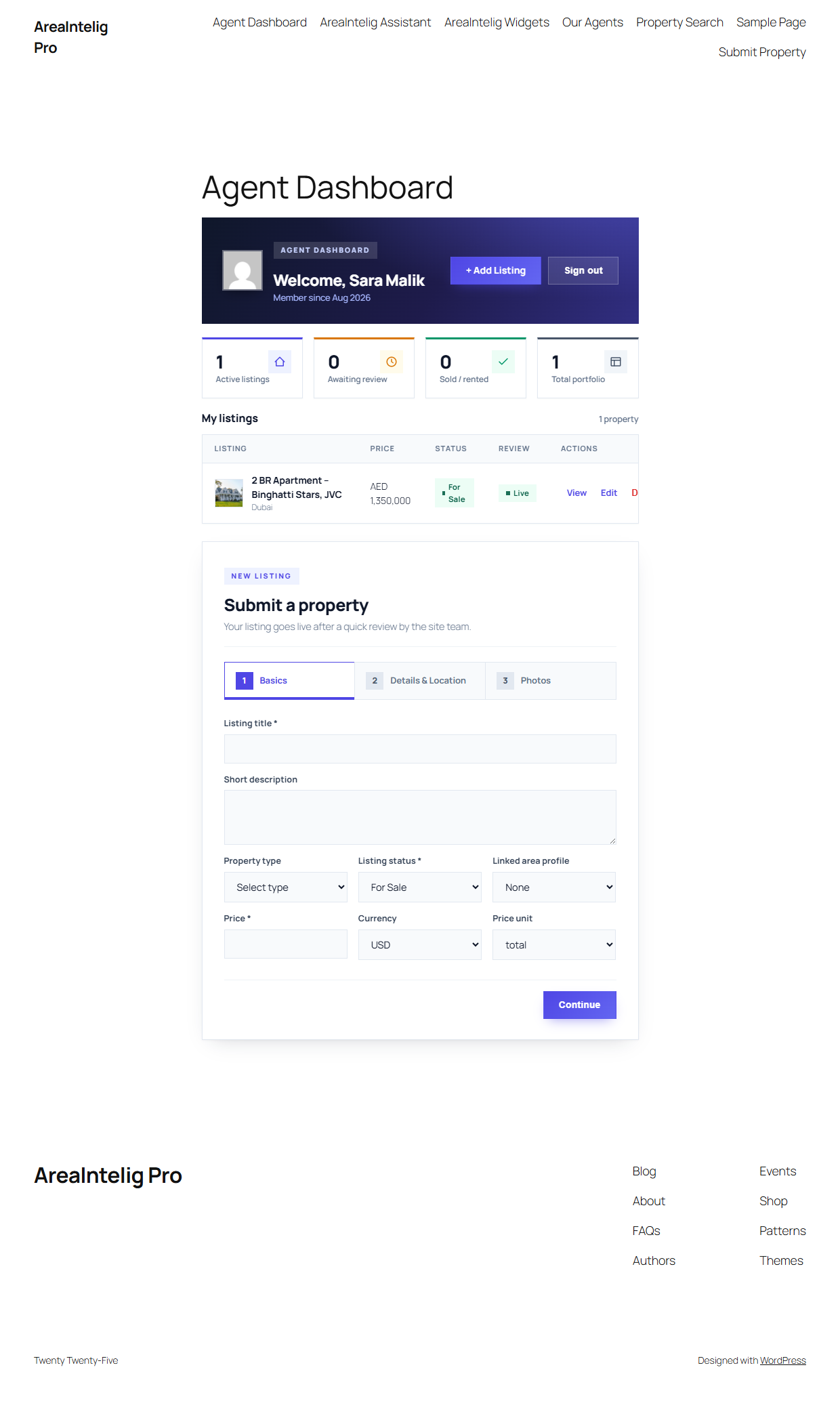
AreaIntelig ships a complete multi-agent marketplace layer. Agents register from the frontend, sign in, and submit listings through a three-step form (basics, details & location, photos) without ever seeing wp-admin. New listings arrive as Pending for your approval (or publish instantly if you enable auto-publish), photos upload straight to the Media Library with the first image set as the cover, and every agent manages their own portfolio from a personal dashboard with stats, edit, and delete. A public directory shortcode lists all agents. Configure everything under AreaIntelig → Agent Portal, where a one-click button also creates the Agent Dashboard, Submit Property, and Our Agents pages for you.
| Shortcode | Purpose |
|---|---|
[areaintelig_agent_dashboard] | All-in-one agent page: sign-in / registration for guests; stats, listing manager, and the submission form for agents. |
[areaintelig_submit_property] | Standalone multi-step submission form (title, price, specs, location, up to 8 photos by default). |
[areaintelig_agent_register] | Registration form (honeypot + rate-limited). Creates the frontend-only Property Agent role. |
[areaintelig_agent_login] | Login form with lost-password link. |
[areaintelig_agents] | Public agent directory with listing counts and contact buttons. |
Renders the full area profile view including scores, description, nearby places, price trends, and investment notes for the specified Area Profile.
[areaintelig_area id="456"]Renders just the score card widget — the circular overall score and individual score bars — for the Area Profile linked to the property.
[areaintelig_score id="123"]Renders the nearby places list from the linked Area Profile — schools, hospitals, transport, shopping, parks, etc.
[areaintelig_nearby id="123"]Renders the price trend chart using the historical price data from the linked Area Profile. Shows a line or bar chart of average prices over time.
[areaintelig_price_trend id="123"]Renders the ROI calculator widget showing annual ROI %, gross yield, net yield, estimated monthly rental income, and investment grade from the property's finance data.
[areaintelig_roi id="123"]Renders the mortgage estimate widget using the property's price, down payment %, mortgage rate %, and loan term to display estimated monthly payment and total repayment.
[areaintelig_mortgage id="123"]Renders a branded, printable property report. The report includes all property details, area score, ROI summary, nearby places, and trend data in a clean print-ready layout.
[areaintelig_report id="123"]Renders the frontend property search widget with filters for city, price range, property type, bedrooms, and bathrooms. Results load dynamically.
[areaintelig_smart_search limit="12"]Renders the rule-based Smart Assistant chat widget for a specific property. Visitors can ask questions about the property, area quality, ROI, risk, deal score, and more.
[areaintelig_assistant id="123"]Green & Climate Intelligence
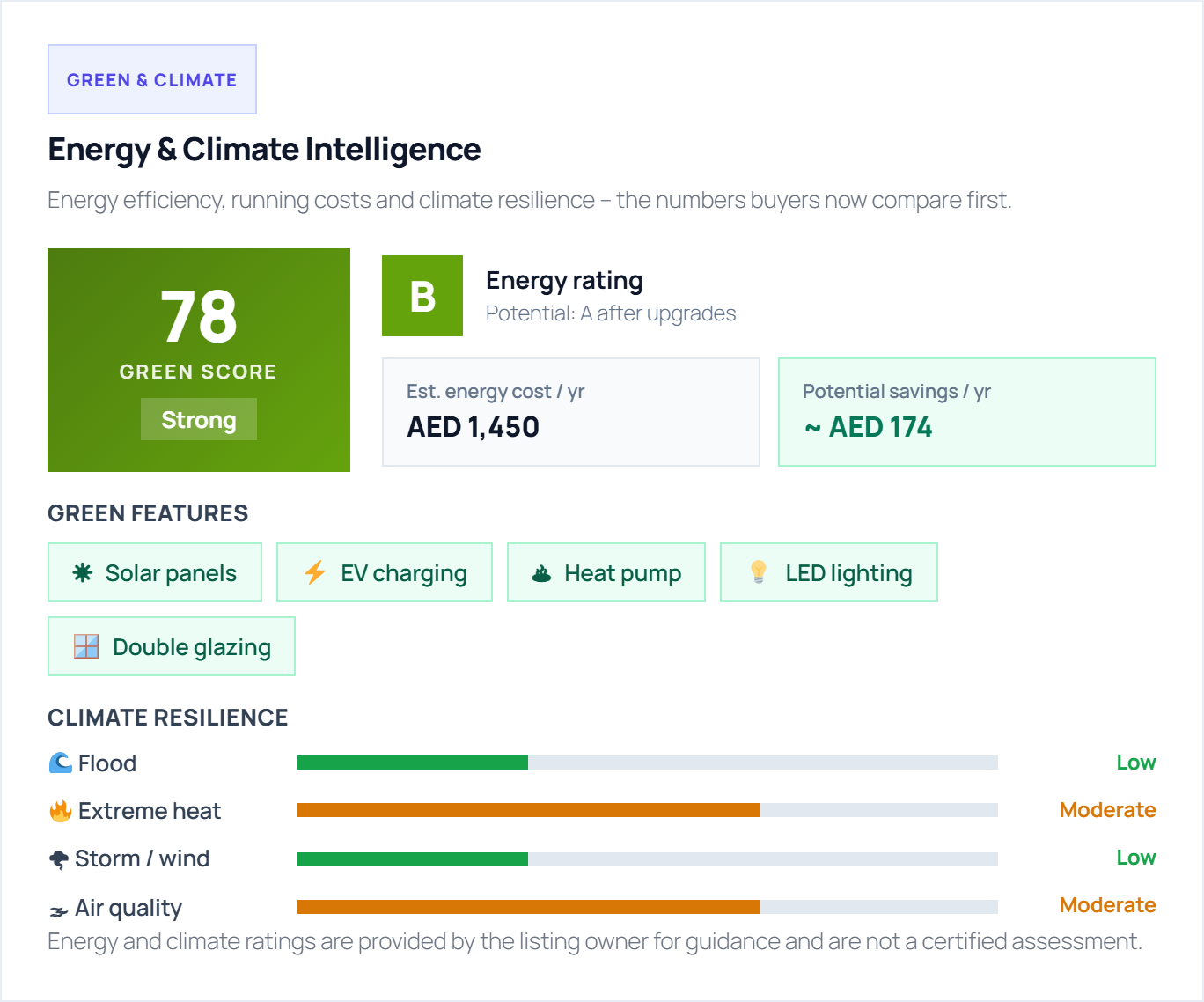
Energy efficiency and climate risk now move property prices in many markets. AreaIntelig captures both per listing and turns them into one number buyers can compare at a glance.
| Group | What you enter |
|---|---|
| Energy rating | An EPC-style A–G rating, the estimated annual energy cost, and the rating plus savings achievable after upgrades. |
| Green features | Solar panels, EV charging, heat pump, insulation, smart thermostat, rainwater harvesting, LED lighting, double glazing. |
| Climate resilience | Flood risk, extreme-heat risk, storm and wind risk, and air quality — each set to a risk level. |
| Green Score | A single composite 0–100 score derived from the three groups above, shown on the listing and as an energy badge on cards. |
[areaintelig_green_score].Shortcodes
AreaIntelig ships 67 shortcodes. Most pages need none of them — single property and area pages build themselves automatically — but shortcodes let you place any individual module anywhere: a page, a post, a widget, or a page-builder block.
| Attribute | Meaning |
|---|---|
id | The property or area post ID to render. If omitted inside a single property or area page, the current post is used automatically. |
post= number in the browser address bar. That is the ID to pass, for example [areaintelig_roi id="128"].All 67 Shortcodes — Quick Reference
| Shortcode | Purpose | Required Attr |
|---|---|---|
[areaintelig_property id=""] | Full property intelligence dashboard | id |
[areaintelig_area id=""] | Full area profile view | id |
[areaintelig_score id=""] | Area score card widget | id |
[areaintelig_nearby id=""] | Nearby places list | id |
[areaintelig_price_trend id=""] | Price trend chart | id |
[areaintelig_roi id=""] | ROI calculator summary | id |
[areaintelig_mortgage id=""] | Mortgage estimate widget | id |
[areaintelig_report id=""] | Printable property report | id |
[areaintelig_smart_search limit=""] | Frontend property search | — |
[areaintelig_assistant id=""] | Smart assistant widget | id |
[areaintelig_wishlist id=""] | Save-to-wishlist button | id |
[areaintelig_saved_properties] | Display user's saved properties | — |
[areaintelig_price_alert id=""] | Price drop alert signup form | id |
[areaintelig_contact_agent id=""] | Contact agent form | id |
[areaintelig_map id=""] | OpenStreetMap property location | id |
[areaintelig_deal_score id=""] | Deal score badge and analysis | id |
[areaintelig_recommendation id=""] | Investment recommendation card | id |
[areaintelig_price_prediction id=""] | Price prediction widget | id |
[areaintelig_investment id=""] | Investment summary box | id |
[areaintelig_property_compare id=""] | Property comparison widget | id |
[areaintelig_compare id=""] | Area comparison widget | id |
[areaintelig_currency_converter id=""] | Currency converter for property price | id |
[areaintelig_cost_breakdown id=""] | Full cost breakdown table | id |
[areaintelig_benchmark id=""] | Market benchmark comparison | id |
[areaintelig_heat_zones id=""] | Area heat zone overlay map | id |
[areaintelig_distance_helper id=""] | Distance to POI helper | id |
[areaintelig_insight id=""] | AreaIntelig insight summary card | id |
[areaintelig_agent_profile id=""] | Agent profile card | id |
[areaintelig_property_media id=""] | Property gallery & media slider | id |
[areaintelig_user_dashboard] | Logged-in user's saved properties dashboard | — |
[areaintelig_match] | AI property match engine — ranks listings to a plain-text query | — |
[areaintelig_match_score id=""] | Buyer-to-property match score | id |
[areaintelig_simulator] | Multi-year investment simulator (cashflow, equity, ROI) | — |
[areaintelig_price_forecast id=""] | Price forecast chart with confidence band | id |
[areaintelig_market_timing id=""] | Buy Now / Wait / Sell timing advisor | id |
[areaintelig_area_battle id=""] | Head-to-head area battle card | id |
[areaintelig_affordability id=""] | Affordability slider (budget → size / EMI) | id |
[areaintelig_portfolio] | Investor portfolio tracker | — |
[areaintelig_real_returns id=""] | Inflation-adjusted real returns (Fisher equation) | id |
[areaintelig_yield_compare id=""] | Rental yield comparison | id |
[areaintelig_avm id=""] | Automated valuation (AVM) estimate | id |
[areaintelig_investment_timeline id=""] | Multi-year investment value timeline | id |
[areaintelig_risk_analyzer id=""] | Investment risk analyzer | id |
[areaintelig_market_summary id=""] | Area market summary card | id |
[areaintelig_auto_insight id=""] | Auto-generated area insight | id |
[areaintelig_lead_score id=""] | Lead score widget | id |
[areaintelig_listing_copy id=""] | Auto-generated listing description | id |
[areaintelig_verified_badge id=""] | Verified listing badge (NOC, registry, approval) | id |
[areaintelig_inventory_badge id=""] | Live inventory status badge + waitlist | id |
[areaintelig_property_status_badge id=""] | Property status badge (For Sale, Sold, etc.) | id |
[areaintelig_future_intel id=""] | Future development intel timeline | id |
[areaintelig_future_pipeline id=""] | Upcoming development pipeline | id |
[areaintelig_area_full id=""] | Full area dashboard (all sections) | id |
[areaintelig_profile id=""] | Compact area profile block | id |
[areaintelig_book_visit id=""] | Book-a-visit form (WooCommerce optional) | id |
[areaintelig_wa_share id=""] | WhatsApp share button | id |
[areaintelig_buyer_readiness] | Buyer readiness score quiz | — |
[areaintelig_alerts_dashboard] | Price-alert management dashboard | — |
[areaintelig_report_history] | User’s generated report history | — |
[areaintelig_theme_toggle] | Light / dark mode toggle | — |
[areaintelig_performance_mode] | Lite / Full performance toggle | — |
[areaintelig_agent_dashboard] | Agent dashboard: stats, own listings, submit form | — |
[areaintelig_submit_property] | Frontend property submission (multi-step, photo upload) | — |
[areaintelig_agent_register] | Agent registration form | — |
[areaintelig_agent_login] | Agent login form | — |
[areaintelig_agents] | Public agent directory grid | — |
[areaintelig_green_score] | Energy rating, running cost, green features & climate-risk panel with a composite Green Score | — |
post.php?post=123&action=edit. It is also shown in the shortcode sidebar box on each property and area edit screen.Frontend Widget Gallery
A sample of the frontend widgets these shortcodes produce — each rendered live from your saved property and area data:
![The [areaintelig_smart_search] widget on the frontend](images/search.png)
[areaintelig_smart_search] widget on the frontend — filter by city, price, type, and bedrooms![[areaintelig_mortgage]](images/widget-mortgage.png)
[areaintelig_mortgage] — bank-specific mortgage / EMI calculator![[areaintelig_roi]](images/widget-roi.png)
[areaintelig_roi] — ROI, net income, and payback period![[areaintelig_deal_score]](images/widget-deal.png)
[areaintelig_deal_score] — deal signal vs the area average![[areaintelig_investment]](images/widget-invest.png)
[areaintelig_investment] — investment grade and signal breakdown![[areaintelig_map]](images/widget-map.png)
[areaintelig_map] — free OpenStreetMap location with nearby highlights (no API key required)Security & Privacy
🔐 Admin Actions
All admin AJAX actions use WordPress capability checks (manage_options) and nonce verification to prevent unauthorized access and CSRF.
🧹 Input Sanitization
All user input from frontend forms and admin fields is sanitized using WordPress sanitization functions before being saved to the database.
🔒 Output Escaping
All frontend and admin output is escaped using esc_html(), esc_attr(), and wp_kses() before rendering to prevent XSS.
🛡 Consent Before Any Third Party
The Smart Assistant, all calculators and every widget run entirely on your own server. The one default exception is the map: OpenStreetMap tiles load from openstreetmap.org, and only after the visitor accepts the consent prompt shown in place of the map. Optional integrations (AI, WhatsApp, Google Maps, GA4) contact a third party only after you enable them and add your own key — see Disclaimer & External Services.
🔑 Nonce Protection
Frontend forms (contact, price alert, wishlist) use WordPress nonces to verify request legitimacy and prevent cross-site request forgery.
🗑 Data Retention
Plugin data is preserved when the plugin is deactivated or deleted by default. Full data cleanup only runs when the Delete Data on Uninstall setting is explicitly enabled.
🌐 Public REST API
The read-only REST endpoints (/areaintelig/v1/properties, /areas, /score) expose published, public listing data only — the same information already shown on your public pages. They query post_status => publish only, sanitize every input, and never expose drafts, private posts, or hidden internal meta. No write, update, or delete routes are registered.
🧪 Demo Content is Optional
All demo areas and properties are optional and are never installed automatically. You import them yourself from IntelliHub → Demo Import, and can remove them at any time — or hide the importer entirely from Settings → Demo Content.
Disclaimer & External Services
Optional Third-Party Services
AreaIntelig works fully out of the box with no external API key or paid service required. Maps use OpenStreetMap by default, and the Smart Assistant is rule-based using only your saved data. The services below are optional and opt-in — they are contacted only if you enable that feature and enter your own credentials:
| Service | Used for (only when you enable it) | Where |
|---|---|---|
| OpenAI / Anthropic (Claude) | Upgrades the Smart Assistant to live AI answers | IntelliHub → AI Assistant |
| Twilio / Meta WhatsApp Cloud | Sends price-drop alerts over WhatsApp | IntelliHub → WhatsApp Alerts |
| Google Maps Platform | Satellite / Street View + address geocoding (otherwise OpenStreetMap) | IntelliHub → Google Maps |
| Google Analytics 4 | Optional visitor event tracking | Settings → Analytics |
| OpenStreetMap | Default map tiles — no key, no billing | Always (free) |
Remove the relevant key/credential at any time to immediately stop all requests to that service. Each service's privacy policy is linked on its settings page, and the full disclosure is also in licensing/EXTERNAL-SERVICES.txt.
How API Keys Are Stored
When you save a third-party API key (e.g. OpenAI, Google Maps) it is stored in the WordPress options table and shown masked in the admin (•••). For at-rest obfuscation the AI key bytes are XOR-combined with your site's AUTH_KEY salt and then base64-encoded. The base64_encode() / base64_decode() calls are used here purely as a binary-safe text encoding for the masked bytes — they are an encoding step, not encryption and never used to hide or execute code. (WordPress ships no native at-rest encryption API; the salt-XOR mask is a lightweight defence-in-depth layer on top of standard database access controls.) A key never leaves your server except inside the authenticated request to the service you enabled.
FAQ — Frequently Asked Questions
Does AreaIntelig require any other plugin?
Does the Smart Assistant use an external AI API like ChatGPT or OpenAI?
Does the map require a Google Maps API key?
Can visitors save properties to a wishlist?
How does the Price Alert work?
What happens to my data if I delete the plugin?
Is AreaIntelig translation ready?
Why are some widgets empty on the frontend?
Can I use AreaIntelig with a WooCommerce or membership site?
Does AreaIntelig work with multisite WordPress?
My property page returns a 404 error. What do I do?
Support
Support URL: adnanthemes.com/support
Before opening a support ticket, please run AreaIntelig → Tools → Diagnostics and include the output in your message. Also include:
- AreaIntelig version number
- WordPress version
- PHP version
- Active theme name and version
- Which feature or shortcode the issue relates to
- Any relevant error messages from the browser console
AreaIntelig v1.0.0 — WordPress Real Estate Intelligence Plugin